


Frequent Visitor
•
12 Messages
Unusually high data usage megathread
Jessie helpfully locked the thread pertaining to this for being "off topic" after merging all relevant threads into the irrelevant terabyte thread.
I thought we should still have a place to discuss this ongoing problem. I took 20 pages of documentation into a store today and was told all they could do was charge me 70 dollars to send out a tech. Out of desperation I conceded.
Any thoughts? Anyone had any resolution yet? Some folks on Twitter seem to have made slight headway and had their accounts credited but aren't sure how to help since they seem to think they just got lucky.
I thought we should still have a place to discuss this ongoing problem. I took 20 pages of documentation into a store today and was told all they could do was charge me 70 dollars to send out a tech. Out of desperation I conceded.
Any thoughts? Anyone had any resolution yet? Some folks on Twitter seem to have made slight headway and had their accounts credited but aren't sure how to help since they seem to think they just got lucky.

strega7
Contributor
•
490 Messages
6 years ago
types24,
There are updates from 10/9 and 12/4 a little later in the thread, here:
https://forums.xfinity.com/t5/Your-Home-Network/Unusually-high-data-usage-megathread/m-p/3268732/highlight/true#M309146
0
Gant45
New Poster
•
1 Message
6 years ago
My data usage suddenly shot up in December - when we were gone for 10 days. I have since gained a full time job, and my husband has a full time job. No teenagers in the house. one child that does not have a tablet or use a computer or phone. Why has my data usage suddenly shot up - 400 GBs? Why do I no longer get notifications that I have used x% of my data? Why am I suddenly using more data when noone is home 40+ hours a week? When calling comcast I had a useless conversation with someone in Indonesia or India. They could not explain my data usage to me. We do not game or stream HD in our house. We only have two people using internet. How are we exceeding 1024GB when 'the majority of households use far less?" and we can stream 600 hours of tv according to Comcast? I would like a detailed, daily explanation of my usage.
0
0
vspaatl
New Poster
•
1 Message
6 years ago
We were also experiencing high data usage and went over the 1024 twice. This year we began using a Fire Stick from Amazon in the kitchen TV. THAT was the culprit! We learned, from our son, that when you turn off the TV, you MUST FIRST go to the Home page, and then turn it off. Otherwise, the TV is in 'streaming" mode all day. I began the experiment this month, February 2020, and thru today, 2/20, we are at 223 GB. Well below the 1024 GB. If you have any streaming sticks in use on your televisions, try this for a while and see if it helps. We certainly hope that is what our problem was, and these crazy overage amounts cease!!!
0
strega7
Contributor
•
490 Messages
6 years ago
Absolutely! Most streaming devices such as Rokus have no idea whether the TV is on or off. And many of the services default to running in "binge mode" such that as soon as one episode ends, they automatically start playing the next. Unless you know your device is different, you should stop the streaming before turning off the TV.
0
Markeydusod
Contributor
•
24 Messages
6 years ago
You'd think if all discussions were merged into a "Megathread" that Comcast might determine this to be A PROBLEM.
I live by myself, I do not play Fortnight, I do not use TOR servers, I download music instrument files sporadically yet, I still, go over your cap every month. I went away for two weeks and still the metering left me just shy of exceeding the cap.
The bottom line is that Comcast is penalizing you for streaming. I've caught flashes of threads that say the way they meter your usage is unfair. Wanna use AppleTV, Roku, Youtube TV, it's going to cost you. The way they meter if you watch a 4-6 GB 4K movie from a streamer does not reflect the actual data size of the show. I am not an expert... I just no there's something rotten in Philidelphia. How about one of you "Comncast Care" "professionals" tell us exactly how you're metering streaming content.
0
0
JRharm
Contributor
•
20 Messages
6 years ago
I'm on track to QUADRUPLE my data usage this month. Normal month is in the 250G range, suddenly on pace to go well over 1000G this month. We did add a Roku tv at Christmas, but for January it only jumped into the low 300's.....now suddenly I'm looking at 1100-1200G. And the irony is that half the time the modem doesn't even work and refuses connections.
Is it possible to see usage by device? The bar chart showing me quadrupling my usuage isn't of any use other than making me mad.
0
0
strega7
Contributor
•
490 Messages
6 years ago
Markeydusod,
Are you sure the 4K movie you watched was only 4-6GB? As I google around for numbers on 4K data rates, I find numbers like 7GB/hour, 11GB/hour, 20GB/hour, and in one case even 33GB/hour. A lot depends both on which streaming service you use, your settings there, and the codecs available on whatever device(s) you are using to view the streams (ie: the same movie can take much more data if the codec in the receiving device is older.) I must admit that I do no 4K streaming myself – these are just numbers I found in the internet.
0
0
Anonymous2222
New Poster
•
3 Messages
6 years ago
We were first contact in Nov regarding high data usage, but never went over and I shrugged it off. But after we got multiple notifications for subsequent months, I decided to finally look into this issue and call comcast. Looking into our usage:
This was taken on the morning of 2/21 at 937 GB. We got a notification in the morning of 2/23 that we have gone over 1024 GB.
I have been on the phone with Comcast on 2/21 and 2/23 regarding this issue and they keep trying to deflect blame on anything besides themselves. We have nothing changed in devices or streaming habits to account for the spike in November and the continual high data usage.
I fail to see how we're using ~35-50 GB/day, when I am the most egregious data user in our home and my computer data usage shows ~260 GB for the whole month of Feb. My wife is the only other user and she would use, at most, 85-90% of my usage, which is why prior to Nov 2019 we were always around 550 GB. We've been with Comcast at this location for 2.5years and before 3+ years at our previous home and NEVER had data cap issues. Our usage habits didn't all of a sudden change in November 2019, and reading through this thread has shown that there must be an error on Comcast's end.
All of my calls to Comcast have led their "service reps" to reiterate that they will investigate and credit me. I have repeatedly told them I do not care about the credit or the "courtesy 2-month overage waiver" because our normal usage will never reach those amounts to warrant an overage credit, I want them to look into and fix their data usage meter and figure out the issue that is causing these continual high data uses.
0
0
nagendra3901
New Poster
•
9 Messages
6 years ago
Hi,
I have a Performance Plus Internet plan with a 1TB limit per month. I got a mail from comcast saying that I have used 90% of my internet for Feb, this looks wrong to me as the max I have used over the last 2 years is around 350GB. Can comcast help me at all to get a better sense of my individual account. For instance when I checked the data usage yesterday night and today morning its decreased by 17Gb. I have looked at the router connections and nothing looks out of place.
0
0
nagendra3901
New Poster
•
9 Messages
6 years ago
I am also curious if someone else has noticed any issues this month? The previous post's related to this issue seem to be in October 2019 and looks like on Comcast's end.
0
0
akaj320
New Poster
•
1 Message
6 years ago
This is now twice in the past 5 months (first time in September 2019) that our Data usage unexplicably spikes. No one at Comcast or their "customer security assurances" team can explain where the usage is coming from. The Xfi app shows that my "profile" was "active" for 6 1/2 hours today when I hadn't even been awake for 3 hours. It shows activity from Midnight to 5am when I was sleeping. I dig in further and looked at every single device in our account (both active and not active) and NONE of them show any activity during that 5 hour time frame when our household was sleeping. So unless the dog was able to get out of his locked crate and got online on some secret device that we doesn't show up but still gains access to our wifi... this seems like a ploy to charge customers for the overage use on data. l am confused and frustrated that Xfinity has ZERO answers. I have already changed my password recently and they actually told me to use a 3rd party appt to measure the data use. Wow. Is anyone else having any issues??
0
0
Anonymous2222
New Poster
•
3 Messages
6 years ago
@ComcastTeds
Could you please look at my issue I posted above? Or have your staff contact me regarding it. I have not received an answer in days.
Thank you
0
0
CCTeds
Gold Problem Solver
•
18.9K Messages
6 years ago
Apologies for the issues and the experience that you described above.
I've asked a colleague to review your account and contact you directly. Thanks for your patience. I have a ticket number for this issue that I will send over via PM (Private Message)
We offer tools to help you track and manage your usage so there are never any surprises about how much data you use:
For all - the link below has some general information on how to avoid overage charges and tips to conserve data usage:
https://www.xfinity.com/support/articles/data-usage-avoid-overage-charges
Providing some additional information, background and tips below from our team that does the data overage reviews.
Customer owned devices
- One example are devices like Ubiquiti uNiFi, which our team most commonly sees as an issue with data usage. The device has an internal metering system along with a periodic speed test built into it. The speed test can accrue massive amounts of data usage without reporting to its own internal metering system because it is part of its system functions, not a device using data even though it is using data. We report its usage because we monitor for all data traffic going to and from the modem/network, not per device connected to their network.
- The number and kinds of devices connected to your network matters. Suggestion is to log into your router to see and verify all the devices connected to your network" (very applicable with customer owned devices).
Metering System:
- Comcast does not have direct access into the metering system to the extent to be able to artificially input or output data usage results or information. Our metering system is regularly audited as well where information on it can be gathered from https://www.netforecast.com/.
It includes everything from the yearly audits to how the metering system works on a technical level. This is done third party outside of Comcast.
Comcast data metering accuracy reports at the link below:
https://www.netforecast.com/comcast-internet-usage-accuracy-reports/
- The metering system is delayed by up to 24 hours. "I watched my meter and it went up by 100GB in the last 3 hours and I just booted up my computer for 15 minutes!" is not accurate - the metering timeframe is not 1:1 - its delayed because it needs to validate data and remove any data that we do not count towards the metering system. This includes things like firmware updates we push out and any other possible data we may push to the network for normal operations.
- Greatest opportunity with Windows 10 devices. Windows 10 has a built in data usage meter for its own data tracking per application/software used on the device for 30 days(Settings -> Network & Internet -> Data Usage tab).
- Similarly could be done for other devices, ex: “Go into Netflix settings and make sure that it pauses after not watching it for a while”, etc.
Overall:
There is no trend or consistency indicating an issue in metering, but rather these have all been unique issues per network requiring the subscriber to troubleshoot/review their network.
The common trend topic is “there is no way I can use this much data”. While the number amount of data a customer can see on the meter is more than what they know to be using, doesn’t mean it isn’t being used.
Common data users:
- Streaming devices left on even when TVs are turned off – continuously streaming and/or misconfigured settings on streaming devices
- Data backups (including cloud backups)
- Large file downloads for entertainment (video games, updates, locally downloaded movies/videos from online services, etc.) or business purposes (files of information/data for business needs, Data backups downloaded from or uploaded to, etc.)
0
0
nagendra3901
New Poster
•
9 Messages
6 years ago
For some reason the image I upload is not visible. Here is the data copied from the data usage page from your website @ComcastTeds
08/01/2019 - 08/31/2019
09/01/2019 - 09/30/2019
10/01/2019 - 10/31/2019
11/01/2019 - 11/30/2019
12/01/2019 - 12/31/2019
01/01/2020 - 01/31/2020
02/01/2020 - 02/29/2020
0
0
nagendra3901
New Poster
•
9 Messages
6 years ago
Here is the screehshot. @ComcastTeds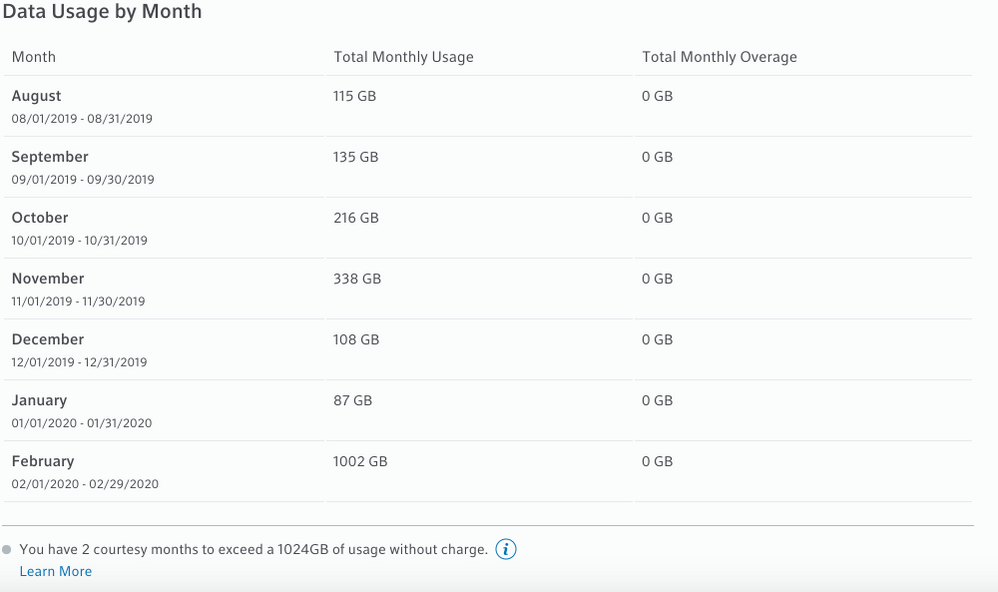
0
0