user_s0yh22's profile

Frequent Visitor

 • 

20 Messages

Tuesday, March 15th, 2022 11:11 PM

Closed

T3 and T4 time out and reboots

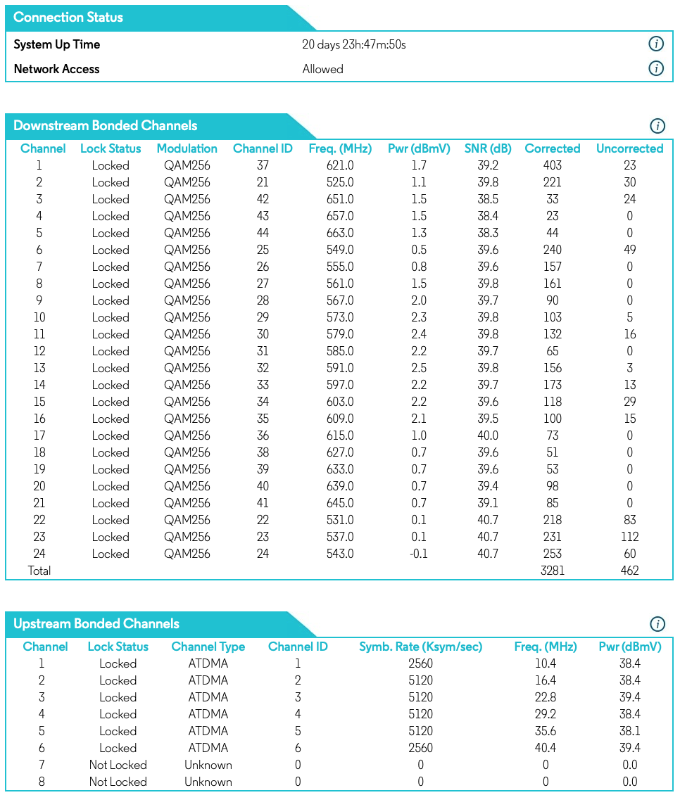
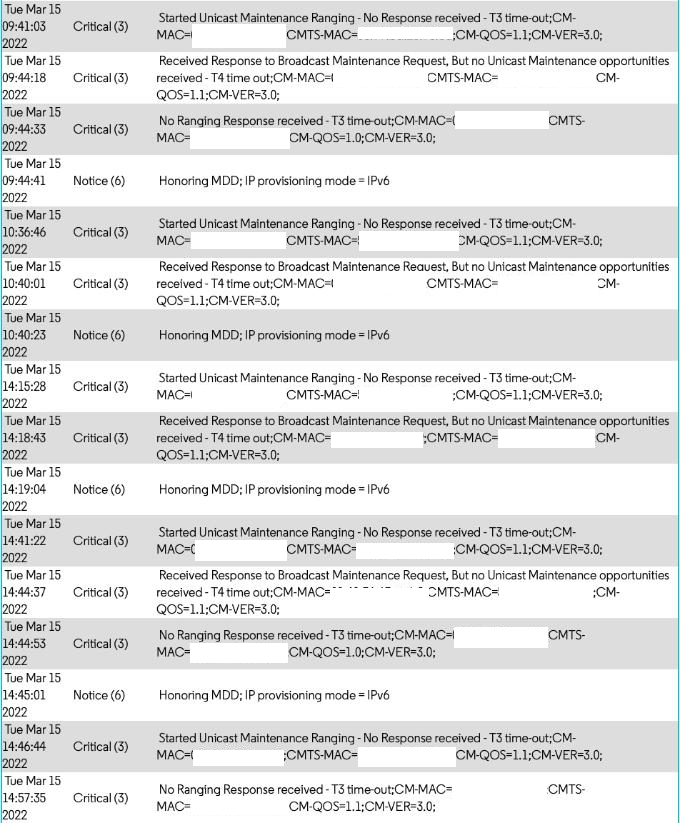
We use Comcast's (600 mbps down/20 mbps up) service with a Motorola MB7621. Overall the service has solid, but beginning this morning our Xfinity internet was knocked offline 3 times for at least a minute each time. MB7621 connection stats and an event log are below. Each of the t4 time outs seems to correlate with when we did not have internet access.

What is Comcast's criteria for the number of T3 and T4 alerts that require additional attention? Was there work in my neighborhood today that I should be calling Xfinity about? What does Xfinity recommend for how to effectively report this and understand what happened?
This conversation is no longer open for comments or replies and is no longer visible to community members.

Oldest First
Selected Oldest First

Frequent Visitor

 • 

20 Messages

4 years ago

This may be a question for Motorola, but it seems odd the MB7621 reports that the system uptime is 20+ days when an internet connection was dropped 3 separate times within the last 24 hours.

Expert

 • 

118.4K Messages

4 years ago

Your post with that pic of the error log entries was marked as being "Private" by the forum software because it contains CM MAC and the CMTS MAC addresses. They are considered to be personal information. Personally identifiable information is a violation of their forum guidelines. Please delete that pic only.

What you can do instead is to copy and paste all of the text (instead of using an image) but you'll need to redact all of the CM MAC and CMTS MAC addresses. The forum bot will not allow your post to be seen publically.

Frequent Visitor

 • 

20 Messages

@EG​ Addresses in the pic are now redacted. Please make this post publicly viewable.

Expert

 • 

118.4K Messages

Done. O/k so even though the signal stats looked o/k at that snapshot in time, the error log entries confirm that something is going on. Perhaps there is noise ingress into the line(s) / an upstream channel / return path impairment somewhere.


There are other signal stat figures that can't be read by the modem. They are the "Upstream Rx Power" (Upstream Receive Power Level), the "Upstream SNR Ch." (Upstream Signal To Noise Ratio), and the "Upstream ICFR" (In Channel Frequency Response). These are as equally important in diagnosing connectivity issues as are the modem's stats.


I'm going to escalate your issue to the Comcast corporate employees that are available to these boards. They will be able to poll the CMTS (Cable Modem Termination System) to check for any real-time degradation and / or error reports, see your node / cable plant, and modem health, and see whether or not everything is in the green zone. They can also see a history plot for the modem and poll for those upstream receive signal stats.

You should get a reply here in your topic. Good luck !

I am not a Comcast Employee.
I am a Customer Expert volunteering my time to help other customers here in the Forums.
We ask that you post publicly so people with similar questions may benefit from the conversation.

Was your question answered? Please mark an Accepted Answer!tick

Frequent Visitor

 • 

20 Messages

Thanks, @EG. This morning, shortly after 10 AM CDT (9 AM according to modem event log), we had another drop in internet connectivity that lasted a few minutes. I'm including this morning's event log here:

Frequent Visitor

 • 

20 Messages

4 years ago

@EG, just to follow up on this thread for you and others... Our next-door neighbors and neighbors on the other side are also Comcast customers. They too are experiencing the issues described above.

An hour ago Comcast texted a couple of us that they are experiencing a service interruption and hope to resolve it by 16:10 today. Thanks for setting us all up with help on this matter.

Expert

 • 

118.4K Messages

4 years ago

O/k my pleasure ! Good luck! Please post back with how things turn out.

Frequent Visitor

 • 

20 Messages

4 years ago

@EG , Comcast's response was swift. Minutes ago we received this Comcast text message:

I'll keep an eye on the modem's event log and report back if the issue persists. Thank you for escalating this matter.

Frequent Visitor

 • 

20 Messages

4 years ago

As luck would have it, about 10 minutes after Comcast texted notifying us the outage was repaired our internet and our neighbors' internet dropped again.

After the post-repair drop-off, our connection to the internet has operated for more than 4 hours without dropping, so we will continue to keep an eye on it and hope tomorrow brings more connectivity.

(edited)

Official Employee

 • 

2.5K Messages

Yes, @user_s0yh22 [Edited username]! Please let us know how it does. Thank you for the update! 

(edited)

I am an Official Xfinity Employee.
Official Employees are from multiple teams within Xfinity: CARE, Product, Leadership.
We ask that you post publicly so people with similar questions may benefit from the conversation.
Was your question answered? Please, mark a reply as the Accepted Answer.tick

Frequent Visitor

 • 

20 Messages

@XfinityLinda

So far today, through 10 am CDT on March 17, our internet connectivity has been reliable. We'll continue to monitor.

Retired Employee

 • 

933 Messages

Thank you for the update, if you have any issues, let me know.

I no longer work for Comcast.

Frequent Visitor

 • 

20 Messages

@XfinityLinda

Internet connectivity was reliable all day 3/17 and the same today - it appears our connectivity issue has been resolved - thank you!

Retired Employee

 • 

933 Messages

I'm happy to hear it's been resolved! If anything else comes up, send me a message! 

I no longer work for Comcast.

forum icon

New to the Community?

Start Here
