Visitor

 • 

3 Messages

Monday, June 7th, 2021 2:43 PM

Closed

I'm getting 99% packet loss after 5 minutes of uptime.

Hi,

I've been getting 99% packet loss exactly 5 minutes after a router reboot/modem reboot or an interface reset. I made a reddit post in the Comcast subreddit, but didn't get any more information. I'm hoping someone has a better answer here.

I'll repost my reddit post because it had the most accurate up to date information about this issue.

"I have the Comcast xb7-t hooked up to a pfSense router(I tried both virtualized and bare metal). It also happens on opnSense and FreeBSD-13. After almost exactly 5 minutes, I'm getting 99% packet loss for 15 minutes, then back to 5 minutes of 0% packet loss. And every 3 hours, it's 99% packet loss for 40 minutes. This pattern repeats, and I have the ping plotter graphs to show it. This started sometime around last Tuesday (5/25) and I made no changes before this started happening.

When a windows machine is connected directly to the modem, everything is fine. Same for Debian based systems. It seems to only happen to FreeBSD based systems including FreeBSD itself.

Right now the only fix I have is to run a cronjob every 5 minutes to reset the wan link "/etc/rc.linkup stop wan && /etc/rc.linkup start wan".

Pingplotter graphs: https://imgur.com/57YwqTz


Comcast support said the modem and signal to the modem look good. And no issues were showing with the modem. I also factory reset the modem to re-download the firmware and config to see if that would help.


Update from June 4th, Comcast tech came to the house and replaced the lines from the pole to the box on the house and checked signal. Apparently there was an issue with the signal, but replacing the lines did not help with this issue ( signal looked good to the tech when he left). I'm also getting a totally different WAN IP now. The geo-location of the new IP's is about 500 miles away."

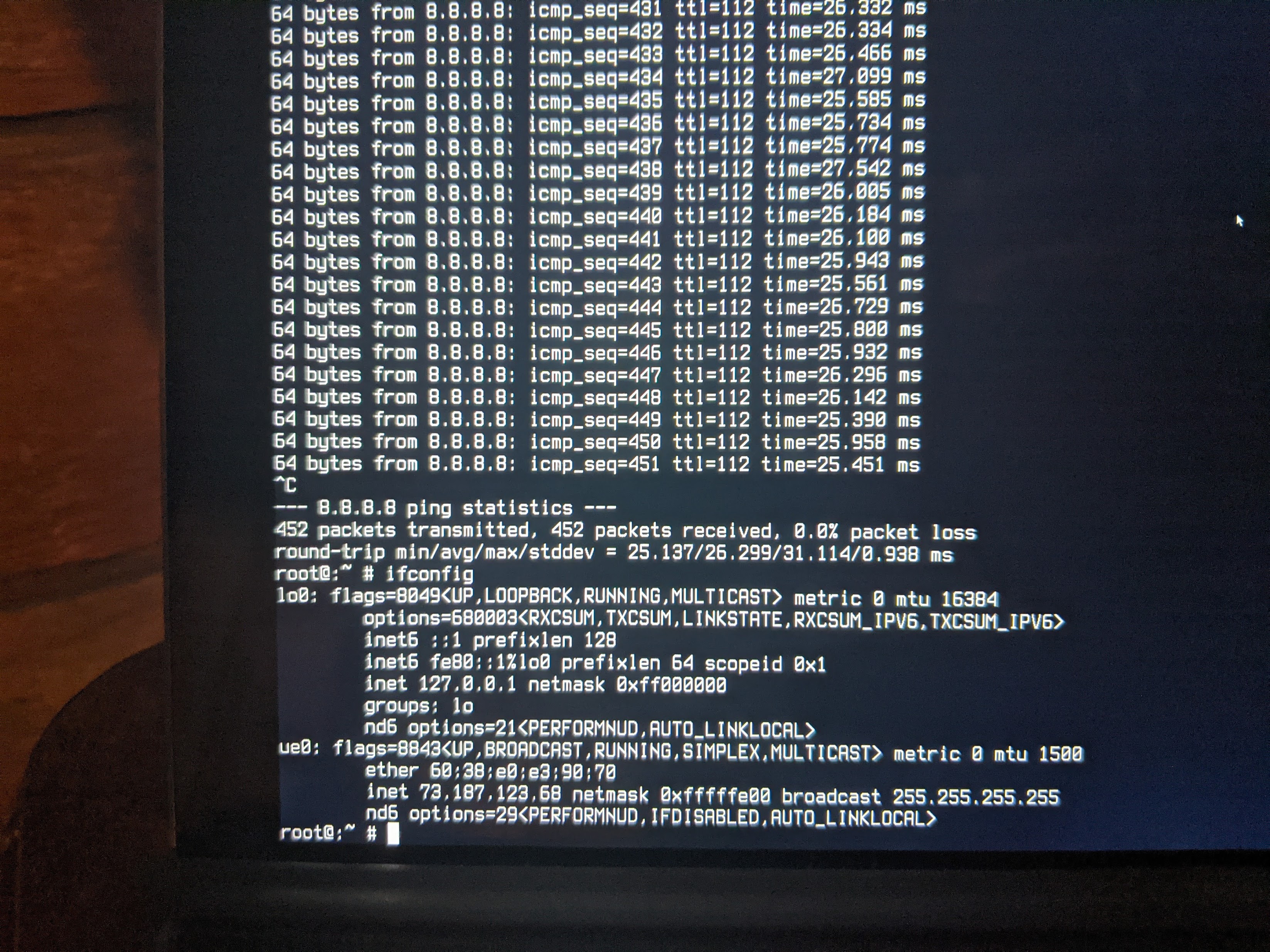
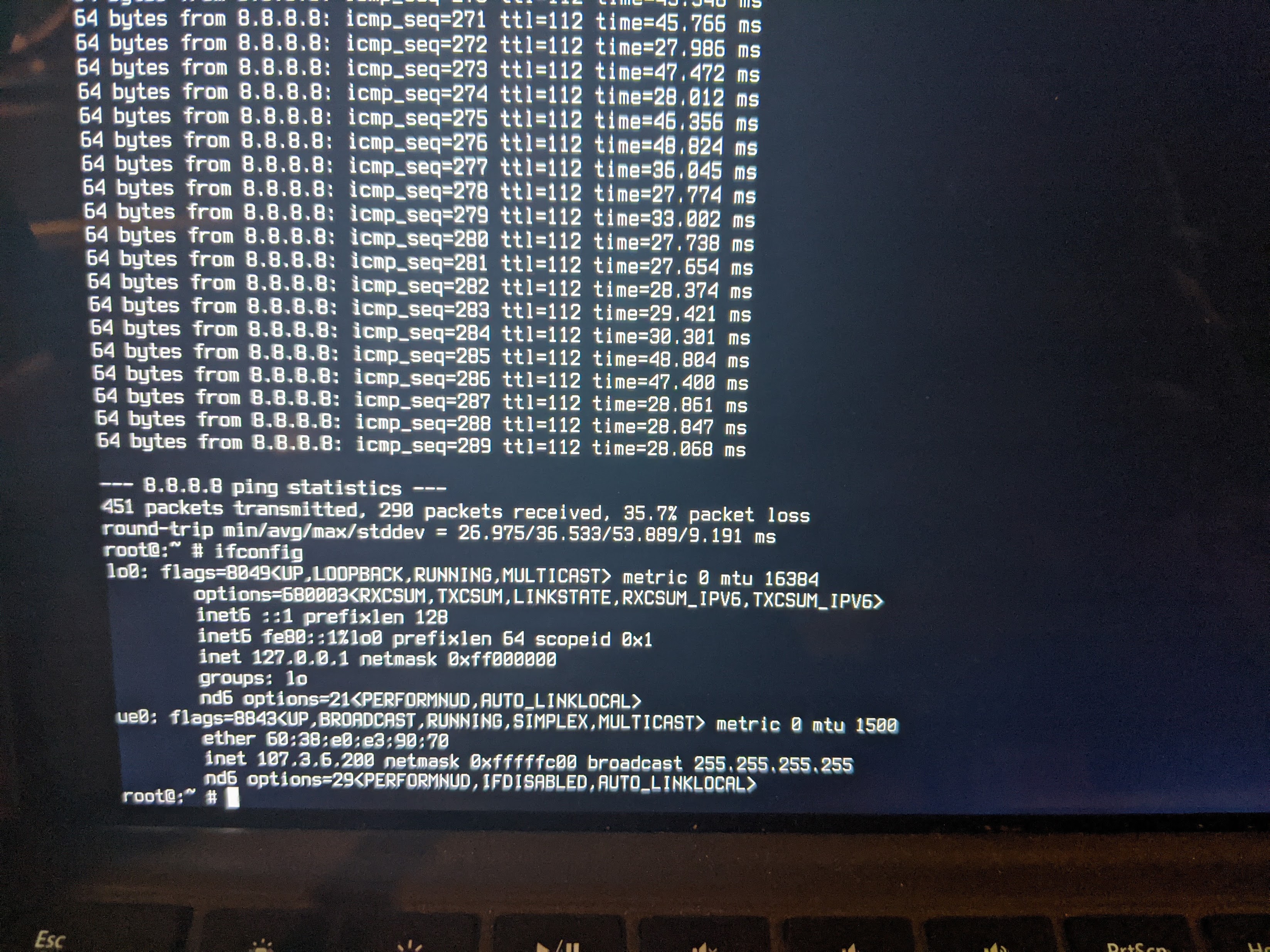
Update: I've also tested a FreeBSD live CD on a laptop in 2 locations with Comcast Service + Comcast modem. They are less than a mile apart. In the other location I can send 450 pings without dropping any. At home, I start dropping pings after around 290-300. Basically 300 seconds, or 5 minutes. 
Thanks!


--Ray

This conversation is no longer open for comments or replies and is no longer visible to community members.

Oldest First
Selected Oldest First

Official Employee

 • 

923 Messages

5 years ago

Hi, @ray_f06081. I want to confirm a few things based on your message. Have you tried just connecting the modem by itself without the additional router? I see you mentioned bare metal but I wanted to make sure we're on the same page. 


Did the technician leave stating anything else needed to be done at say the node or the head-end where all the cable lines go to, or any maintenance work would need to be done?


Did he replace the XB7 you have set up or just the cables? 

Visitor

 • 

3 Messages

Hi ComcastStarr,

Yes, I've connected a Desktop PC with FreeBSD installed, without a router, directly to the XB-7 with an ethernet cable. The tech did not mention additional work that would to be done. He did mention that Comcast has been upgrading the nodes in my area and they've seen some weird issues( some webpages not loading/DNS issues). I've also had a bunch of service outages over the last 3 months, so I'm assuming that was the upgrades taking place. 

Also getting an IP address in Vermont is really strange. I'm in Pennsylvania. I have some packet captures from my WAN interface and my IP shows up as c-107-3-X-X.hsd1.vt.comcast.net. I put X's in to mask the rest of the address. 

The XB-7 has not been replaced yet. I'm going to contact support today to see if they can send a tech out with a new modem. Is there a charge for the tech bringing the modem? I'm not able to get to my local Comcast store currently to swap it myself. 

Thank you for the reply,

Ray

Official Employee

 • 

923 Messages

Thank you for providing us with all of these details. This definitely helps us narrow down the issues at hand and gives us a better starting point.


From everything you've told us so far, it definitely sounds like there may open work orders in the area, possible maintanace as well. Since you are also wanting to see about getting another technician out, and replacing the modem, I do think our next best bet is to speak privately regarding this. From there, I can see about any charge for you, and what you'd be looking at (it's based on the area you are in). As well as getting you that new modem, if you're open to it, we can see about shipping it as well. Whatever would work best for you. It's not a problem that you cannot make it to the store, I understand, with Covid and daily life, it can make it hard to get in. So that's not a problem. 


Let's go ahead and continue in a private message. Please send me that with your name and address so I can get you pulled up.  


Click "Sign In" if necessary

Click the "Peer to peer chat" icon or https://comca.st/3vaNpwq

Click the "New message" (pencil and paper) icon

Type "Xfinity Support" in the "To:" line and select "Xfinity Support" from the drop-down list which appears. The "Xfinity Support" graphic replaces the "To:" line

Type your message in the text area near the bottom of the window

Press Enter to send it


From there we can continue. 

I am an Official Xfinity Employee.
Official Employees are from multiple teams within Xfinity: CARE, Product, Leadership.
We ask that you post publicly so people with similar questions may benefit from the conversation.
Was your question answered? Please, mark a reply as the Accepted Answer.tick

Visitor

 • 

3 Messages

5 years ago

It took 3 modem swaps but the problem is now gone!

Official Employee

 • 

1.4K Messages

That is definitely an odd happening and I am glad it is better. I just got an XB7 and it works amazing, but anything is possible with technology. I appreciate your time working on it! 

I no longer work for Comcast.

I am an Official Xfinity Employee.
Official Employees are from multiple teams within Xfinity: CARE, Product, Leadership.
We ask that you post publicly so people with similar questions may benefit from the conversation.
Was your question answered? Please, mark a reply as the Accepted Answer.tick
forum icon

New to the Community?

Start Here