
Visitor

 • 

8 Messages

10/28/2026 5:32 PM

midsize browser window jumbles xfinity.com display

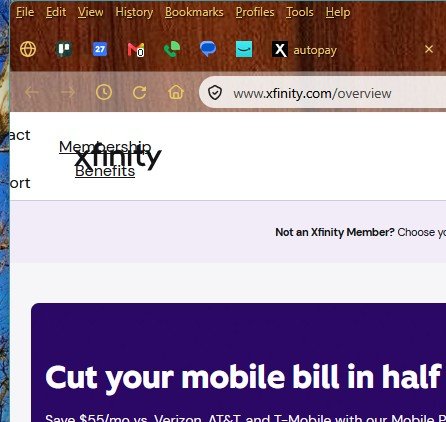
The Xfinity website for desktop browser needs some fine-tuning. Attached is a sample of what happens to the navigation links across the top of the site when my window is a bit over half the width of my screen. Widen it a bit, and the links appear nicely. Narrow it a bit, and they disappear, replaced by a hamburger menu. But, since this is the standard width of my browser window, it took me a while to figure that out.

Oldest First
Selected Oldest First

Official Employee

 • 

2.9K Messages

5 hours ago

@user_y7rb33 I’m glad to hear you were able to use the website and figure the sizing for your browser.

Do you have the same issue with all web browsers?

Have you tried our Xfinity App?

Visitor

 • 

8 Messages

@XfinityKei​, thank you for looking at this so promptly!

I just now looked at xfinity.com on Chrome (which I almost never use), and the problem is not there. The site switches from neat links across the top to a hamburger menu at a certain width, no fuss, no muss.

I'm seeing this problem in Firefox 158.0.1, on Windows 11 25H2, build 26200.9457, but I updated both Firefox and Windows in the last week. I was seeing this issue before those updates as well.

Unfortunately, the whole interface for phone apps is very difficult for me to use. Not a realistic option in my particular case.

Official Employee

 • 

2.9K Messages

@user_y7rb33 Is it multiple sites or just one site with the issue?

Did the issue start after you updated your browsers?

I am an Official Xfinity Employee.
Official Employees are from multiple teams within Xfinity: CARE, Product, Leadership.
We ask that you post publicly so people with similar questions may benefit from the conversation.
Was your question answered? Please mark as Best Answer.tick

Visitor

 • 

8 Messages

@XfinityKei​, do please read carefully. You've run into a long-time English major here.    8^p    (That's an old-fashioned text emoji. Look at it sideways.)
As I said in my previous response, I updated both Firefox and Windows in the last week. >>I was seeing this issue before those updates as well.<<

I haven't seen the problem on any site other than xfinity.com. The problem appears on every page I've seen in xfinity.com where those nav links are across the top. As you probably know already, the site is painfully slow, but I did take the time just now to:
= verify that the problem appears at xfinity.com;
= verify that the problem appears at https://customer.xfinity.com/membership;
= shut down Firefox and restart it (which did another update, so now I'm running Firefox 159.0 (64-bit));
= re-verify that the problem appears at xfinity.com;
= re-verify that the problem appears at https://customer.xfinity.com/membership.
So that makes at least two Windows 11 releases and at least three Firefox releases where this problem appears.

Thank you for persisting in figuring this out!

Official Employee

 • 

3.2K Messages


user_y7rb33 Thanks for clarifying. You’ve already confirmed that this is happening only on xfinity.com, across multiple pages, and that it started before your recent Firefox and Windows updates. I appreciate the detailed testing you’ve done, and we’ll keep the focus on the website rather than repeating steps you’ve already ruled out.

Looking at the screenshot you provided, one thing I’d like to check is the browser zoom level. If Firefox is zoomed in above 100%, it can reduce the amount of space available for the page and affect how the navigation is displayed as the window size changes. Could you check that Firefox is set to 100% zoom and see if you’re still able to reproduce the issue?


I am an Official Xfinity Employee.
Official Employees are from multiple teams within Xfinity: CARE, Product, Leadership.
We ask that you post publicly so people with similar questions may benefit from the conversation.
Was your question answered? Please mark as Best Answer.tick

Visitor

 • 

8 Messages

@XfinityPeterH​ The problem appears at 100% zoom and 90% zoom. It no longer appears at 110% or 80%.

If I set the zoom to 90% and start widening the window, the nav links snap back into position while the window is still a good bit narrower than if I do the same at 100%. Predictably, if I *narrow* the window at 100%, the hamburger menu appears while the window is still a good bit wider than if I do the same at 90%.


(In my thoroughly amateur analysis, all this suggests we're looking at a CSS pixels issue.)

Administrator

 • 

5.5K Messages

3 hours ago

Hey @user_y7rb33! This is certainly an interesting one. I attempted to duplicate the issue you are having with Firefox, and it was all working fine in my browser. I also had another colleague test on Firefox along with other browsers, and it all folds into the menu without any issues. The only common factor between your updates would be the same web extensions being used on your Firefox browser. Can you see if you still have this issue if you try it in a New Private Window? This should bypass the cache and disable web extensions.

forum icon

New to the Community?

Start Here