

Visitor
•
1 Message
Exposed wiring hazard complaint - pedestal
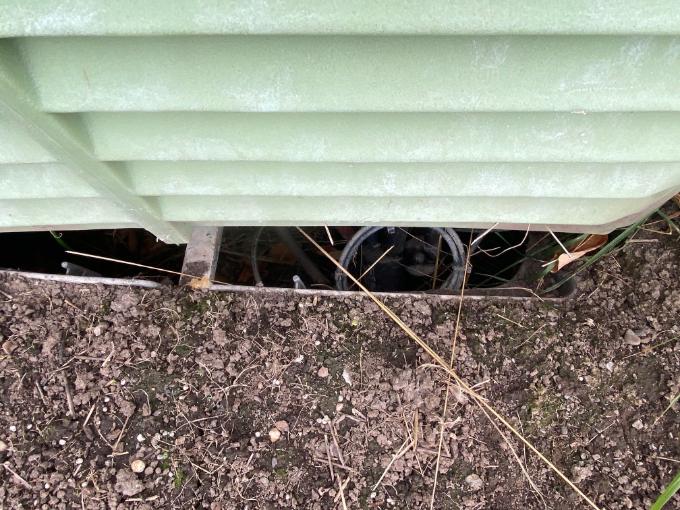
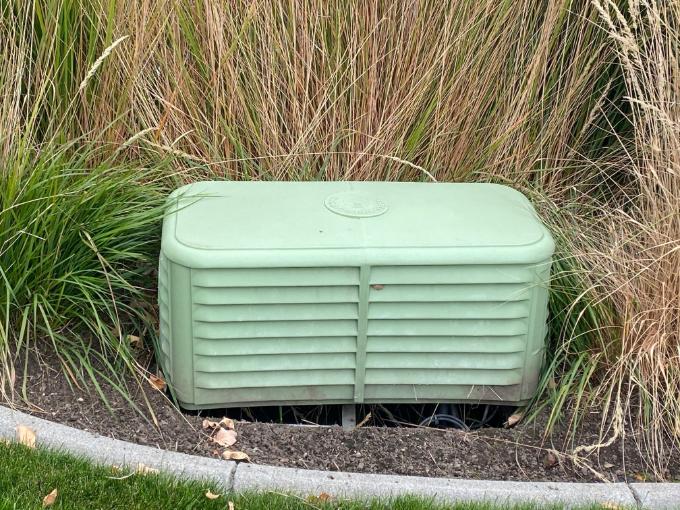
This is my third attempt to request that wiring be covered up under the pedestal box near our sidewalk as it creates a safety and property hazard. Work has been done in the last six months in our area by Xfinity or one of their subcontractors. As you can see in the pictures, there is a open trench under the box with wires exposed. Our first attempt to request it be fixed or filled was by phone to Xfinity. They came out, and we were told that they planned to install a larger box that would cover up the hole and wires. A few months went by with no action, so we contacted Xfinity a second time by submitting an electronic ticket for the hazard. Xfinity visited our house a second time in early September and said it looked like 'no big deal' and that they didn't think or intend to do anything about it.
We have many young children in our neighborhood who use the sidewalk. This will be the third time we have made Xfinity aware of this situation. We do not want a child to get hurt by this "no big deal". All we want is for this to get fixed, which does not seem like too much to ask.

XfinitySeth
Official Employee
•
1.7K Messages
3 hours ago
Hey there user_nii2kp 👋 I appreciate you dropping by our community for help, and hope you're having a great start to your week! Our teams never want exposed lines to be left unattended like this for any amount of time, especially when kids are around, so rest assured we'll help do everything needed to ensure our local teams address this asap 👍
To get started, please send us a direct chat message with your full name, the name listed on the account (if different), and the full service address associated with your account to “Xfinity Support”.
How to Send Us a Direct Message:
You can see how to send us a direct message here,
How to: Direct messaging within the forum | Xfinity Community Forum
0
0
user_zm0z3b
Visitor
•
2 Messages
2 hours ago
We have 65 year-old Ponderosa pine trees in our backyard whose heavy limbs are resting on the cable lines spanning our backyard. How do we schedule an appointment to have them removed before the heavy winter snow hits?
0
0