



Visitor
•
3 Messages
Periodic extremely high latency and sometimes complete connection loss. PingPlotter shows problem occurs on very first hop.
Hi all,
I'm currently experiencing periodic episodes of extremely high latency and even connection loss.
Previously to around two weeks ago, my internet was fairly rock solid, getting no latency and very good speeds. Something happened around two weeks ago where I started to get random episodes of extremely high latency (2500+ ms) and about half the time it completely lost the connection. I did some work with PingPlotter and reading through the available information in my router's admin portal (was then on an XB7 rented from Xfinity). Earlier this week, I had a scheduled appointment where an Xfinity worker came out and did some tests and saw a few issues. He issued me an XB8 to replace my XB7 and that fixed the majority of the issues he saw, but as he ran some tests saw the signal being a bit weak. After running some more tests, that turned out to be a small issue on my internal line that runs up my wall from the basement (where the cable comes in) up to my office where my XB8 sits. Its connector housing where it exited my wall and connected to the outlet was a bit off. He replaced that and the signal showed perfectly fine so he completed the visit and all was fine for the rest of the day and then half the next one... until the problem came back. I will say it's not nearly as bad in frequency. I only see it a few times a day now instead of a few times an hour, but still I will see extremely high latency and occasional connection loss. The rest of the time when these episodes aren't happening my signal shows as PERFECT and I get even beyond my normal speeds, but during the episodes, not only is my latency high, but my download speeds wilt to under 200 Mbps and sometimes to the point where nothing will load (measured in Kbps instead of Mbps at this point). I will say that with the new XB8 some of these issues have also lessened and neither the high latency nor the connection loss quite as long (anywhere from 5 to 90 seconds vs at least 2-3 minutes). Also as I haven't noted it before, my main PC is directly hard wired via high quality cat6 ethernet cable to the router, but the high latency and connection loss happens to ALL my devices.
But this is unacceptable as I work remotely from home 100% and I'm being dropped from meeting calls, etc.. Also, I'm a gamer by hobby and that has become quite a chore when I lose connection to half the servers I'm connected to partway through a game and my wife has to deal with pausing streaming whatever shows she's watching. It's incredibly frustrating.
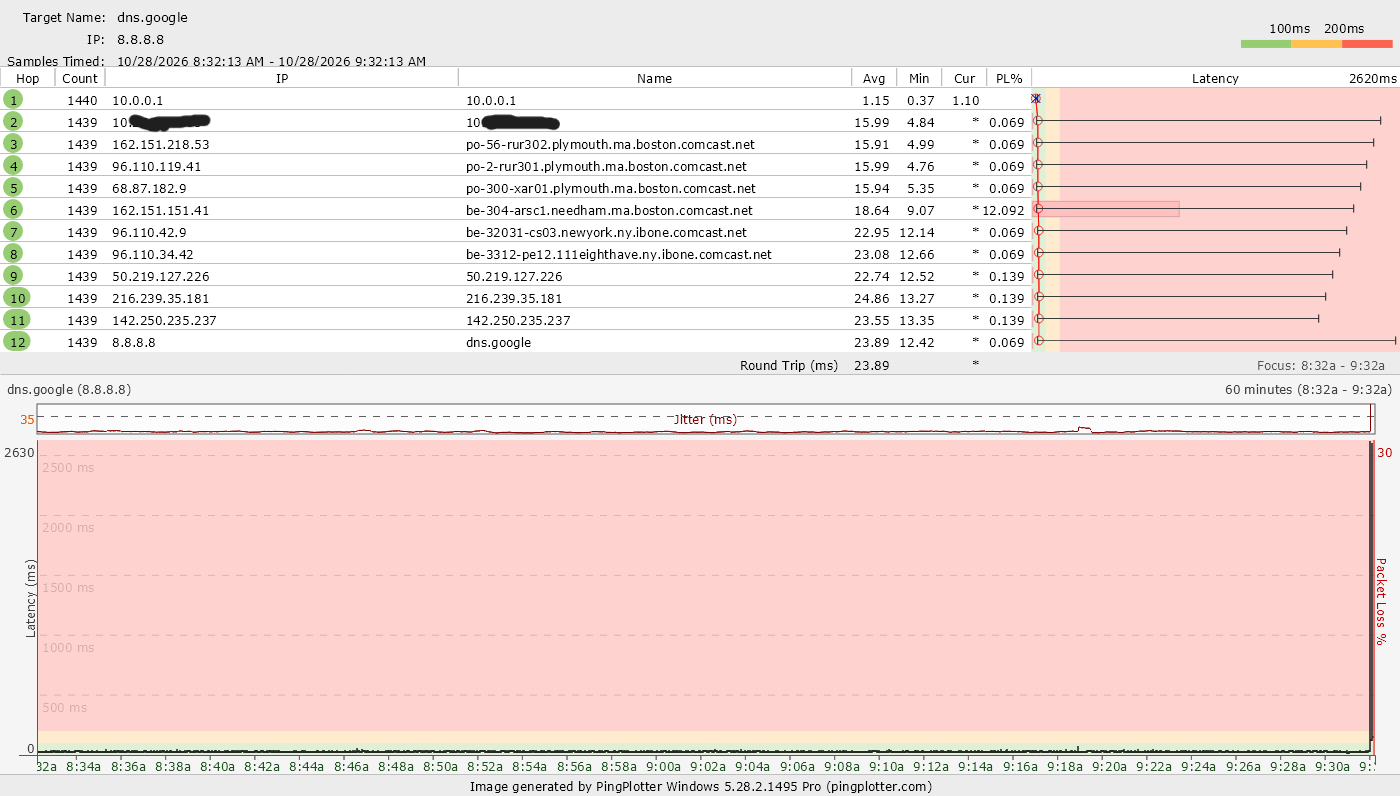
Here is the log of the hop latencies to the google dns servers:
This is just from the last couple of days as you can see, but these ones show complete connection loss for all but one episode and that one showed almost 1800 ms.
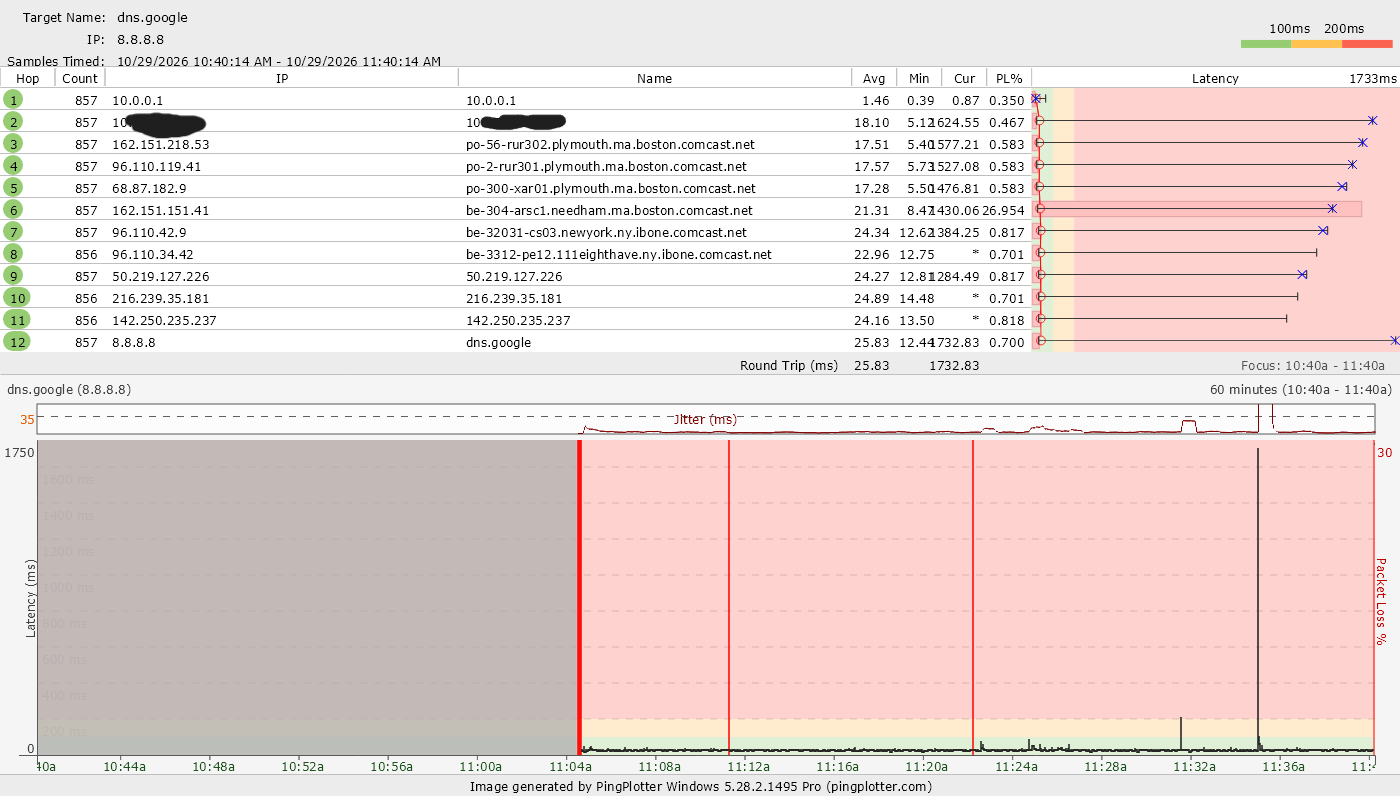
Here's a couple of examples of the graphs during a couple of those events, one showing complete loss and the other with just an extremely high ping:
Here you can see the ping was around 2600 (2620) before connection was lost.
Here you can see the latency reached 1733 but at least didn't lose complete connection.
Here's also my Xfinity connection info via router portal. This is with an uptime of just over a day:
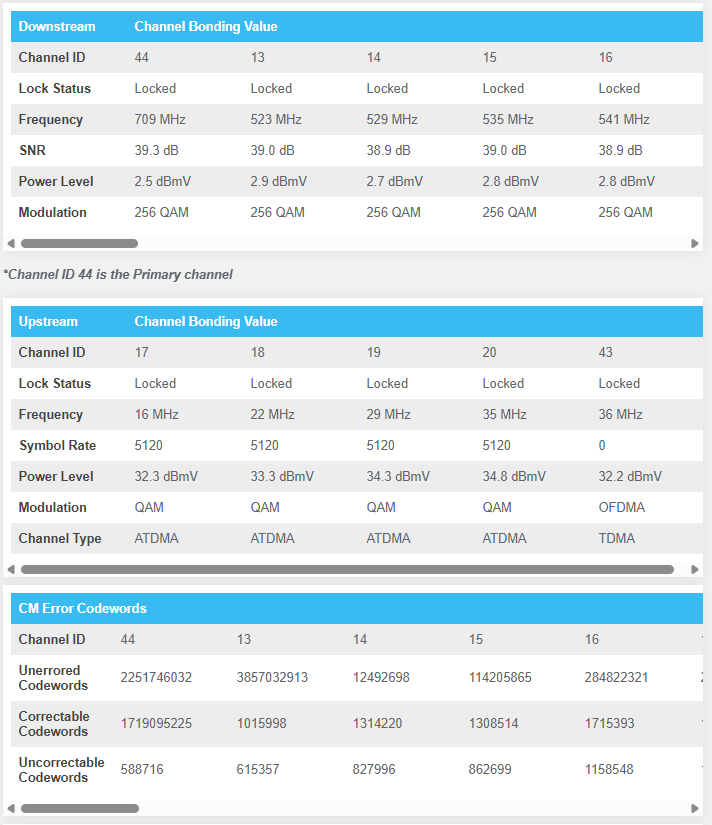
I have heard a lot of Uncorrectable Codewords can cause an overload on the router and it just stops responding until it catches up, sometimes dropping the connection, but not sure if these are enough to cause that or if that's still the case (some of those posts were a little older). A further note, my neighbor has said he has somewhat similar (though maybe not identical) issues that he's been fighting for like 10 years with Xfinity and if they weren't literally our ONLY option for internet where we live he'd have switched long ago. But like I said, I'm not sure if his issues are identical to mine or not without going through some of these findings with him and his setup.
To me, I kind of doubt that having another service appointment sent to my house would help, though maybe there's something wrong with the amplifier or something external to my house? I feel like there's something wrong on Xfinity's end causing this even in a brand new XB8 modem/router. But seeing as how it's the very first hop where problems are being seen... SOMETHING isn't right. I could very well be wrong, but any help would be amazing. Honestly, I'm making this post in the hopes I can talk directly with the Support team and I know making a post is the first step to even enable that possibility, but if someone in the larger community has an answer or suggestion that would also help immensely.
Thanks so much in advance and hopefully we can resolve this issue!

XfinityOrlandoM
Official Employee
•
4K Messages
5 days ago
@Frohteloss
Thanks for reaching out to us. We do apologize for any inconvenience you're having with your connection. After your last appointment, once the issues have arisen again, are there any troubleshooting steps you've taken, like rebooting your modem by unplugging the power cord for 30 seconds or logging on to the Xfinity app to do some troubleshooting?
https://www.xfinity.com/support/articles/internet-connectivity-troubleshooting
2
0
EG
Expert
•
122.8K Messages
5 days ago
@Frohteloss @XfinityGabriel
Please circle back here and post any possible solutions for the issue here in these open public forums so that all readers here may benefit from the exchange / info. This is in keeping with the spirit for which these public help forums were originally intended. Thank you.
0
0
Frohteloss
Visitor
•
3 Messages
2 hours ago
Just an update, after getting the first tech out, he noticed some oddities in my signal and upgraded me from an XB7 to an XB8 as well as removing an unneeded splitter and replacing a connector on the cable that went from my basement where the line comes in up my wall to my office where the router/modem is hardlined to my PC. After that he reported my signal seemed fine. Unfortunately, I've been monitoring my signal and its "seems fine" (actually it's near perfect) 95% of the time when I'm not experiencing the issue. So it was fine for the next like day and a half. So I contacted Xfinity via DM after being invited to create a chat and went back and forth with them and provided some of the evidence from my PingPlotter logging. They agreed there was still an issue and sent an "advanced" tech out who at first did the same thing as the first tech, but then didn't discover anything so then he was awesome and literally just sat in his truck in my driveway monitoring the signal sent FROM Xfinity instead of what I was receiving on my router/modem and lo and behold! He visibly saw my signal strength drop from Xfinity's side.
With that evidence he was able to put in a ticket to get an actual maintenance crew out to look at the lines coming into my neighborhood, the amplifier near my house, etc. So obviously that doesn't make the issue solved, but at least progress!
I'll report back after the maintenance crew comes through and let you all know if that actually solves the problem or not.
1