



Visitor
•
6 Messages
Web Stream Portal: In-Progress DVR Recordings Disable Fast Forward (Metadata/Duration Bug)
Over the past week, I have been unable to fast-forward in-progress ("in-flight") Cloud DVR recordings when watching via the web portal on Windows 11.
The Symptoms:
The Fast-Forward / Skip Forward button is completely disabled/greyed out in the web player.
The scrub bar registers as filled to the end (
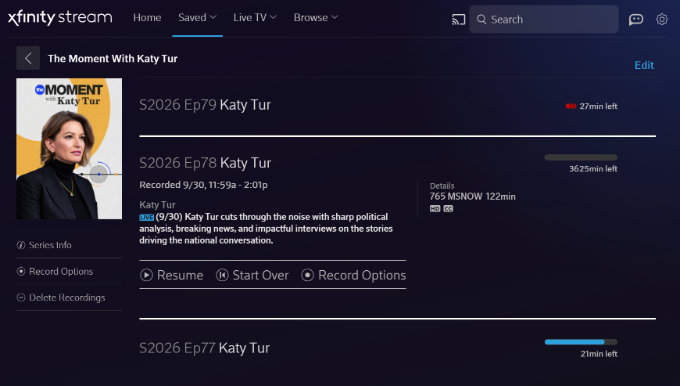
2:01:30), locking the playhead and making it impossible to seek forward through commercial breaks while watching behind real-time.Looking at the Saved Recordings list, the metadata calculation is clearly broken—one recording displays an impossible duration of "3625min left" instead of the actual remaining broadcast time.
Once a broadcast concludes completely and converts to a static Cloud DVR asset, playback and forward seeking return to normal.
(Attaching screenshots showing the greyed-out fast forward button / pinned playhead, as well as the '3625min left' metadata error).
Troubleshooting Already Completed (Issue Persists):
Tested in both Google Chrome and Microsoft Edge on Windows 11 (identical behavior in both).
Cleared all site cookies, cache, and local storage data for
xfinity.com.Toggled Hardware / Graphics Acceleration off and on.
Attempted keyboard navigation shortcuts (Right Arrow, L).
Ran a "Sync DVR" command on our physical X1 equipment.
Crucial Detail: This issue is isolated to the web browser player. Playing the exact same in-progress recording on the Xfinity Stream iOS app works perfectly—the live buffer is recognized, scrubbing is fluid, and skip controls function normally.
This points directly to a manifest/metadata parsing bug in the web player rather than a client-side browser cache or network issue. Could an official Comcast/Xfinity representative please escalate this to the web platform engineering team?


user_wr018h
Contributor
•
18 Messages
18 days ago
I have the exact same issue in my Windows 11 desktop, Samsung smart TV, and Amazon Fire tablet. The timeline shows I've reached the end of my recorded stream with more than 2 hours of unplayed recorded content in place. The fast forward button is grayed out. The fast rewind button is not grayed out but clicking it takes you back to the start of the recorded content rather than back the expected 15 seconds. When the recording is complete, all play controls start to function as expected.
I would very much appreciate an ETA on a fix for this.
12
user_wd2lbr
Visitor
•
1 Message
17 days ago
Count me in as another user with the same problem for a few weeks now.
0
DAN.PET
Visitor
•
23 Messages
15 days ago
Did Xfinity delete your comment from last night? I saw this in an email update, but it's not visible now (see below). We're getting nowhere with 'support'; maybe time to contact corporate leadership directly? This via Google/AI; haven't vetted it yet.
[Edited: "Personal Information/Soliciting"]
Your post via the mail I got:
Huge thanks to everyone keeping this thread alive and sharing updates. Honestly, it is incredibly frustrating and downright unacceptable that we are approaching the one-month mark with zero actual progress from Comcast.
Since we keep getting generic replies from front-line support asking 'is it fixed yet?', here is the REAL state of the bug for anyone new landing on Page 2:
Status: STILL COMPLETELY BROKEN on all desktop web browsers (Windows/Mac, Chrome/Edge/Firefox).
The Bug: The web player's scrub bar is completely hallucinating the duration of in-flight recordings (showing impossible times like '3625min left'). This completely locks the playhead and permanently greys out the fast-forward controls until the broadcast actually ends.
Workaround 1 (The 'Jedi Mind Trick'): Huge shoutout to the community for finding this ridiculous but functional hack: Delete your in-progress recording, go back to the Live TV guide and hit record again, then go to your 'Deleted Recordings' folder at the bottom of your Saved list and hit 'Recover' on the first half. This tricks the system into treating the recovered file as a 'finished' recording, giving you your FF controls back!
Workaround 2 (Mobile): The Xfinity Stream iOS and Android mobile apps remain completely unaffected. This is strictly a web platform manifest issue.
Workaround 3 (Jumping Ship): As @DAN.PET rightly pointed out, if you are trying to watch the World Series, NFL, or NBA season openers on a PC right now, [Edited: "Soliciting"]
To the Official Xfinity reps reading this: Please stop asking us if restarting our browsers fixed a backend platform coding error. We are paying customers missing major live events because of a broken web player. We need a real ETA from the web engineering team, not another Tier 1 troubleshooting script.
(edited)
0
0
sflick2
Visitor
•
4 Messages
15 days ago
I'm having the same issue. I called a few weeks ago and after troubleshooting which seemed forever, she finally said there has been an issue since the beginning of Sept. I called again today Oct. 27, again did troubleshooting but nothing helped. She didn't tell me they were aware of the issue even when I told her what the last agent told me. It's sad that this has been an issue for so long and it can't be corrected. I feel we pay enough for this service, this shouldn't be happening. The odd part is that it works fine on my TV and I pad but not my laptop.
0
user_wr018h
Contributor
•
18 Messages
15 days ago
Xfinity first line support staff ... I realize you can not correct this as it's a programming issue (vs. a service interruption, etc.). It's more than three weeks old and obviously can be fixed as it worked ~ a month ago.
If you genuinely want to help, please escalate this to the appropriate department to actually get it fixed. Further note that this is a Windows computer specific issue vs. all devices further indicating it can be fixed. If nothing else, consider rolling this software function back to a prior version that works.
Clearing cache and cookies, changing browsers, logging out/in, etc. does not work so continuing to suggest these kind of individual user solutions is useless.
In summary, please do something!
2
user_anvjsh
Visitor
•
1 Message
14 days ago
I opened a case 3 weeks ago. No response or solution from Xfinity. Anyone else have any updates?
1
0
user_w1p4e3
Visitor
•
1 Message
13 days ago
I am having the same issues as previously well documented. When I called Xfinity about this, they set up an appointment to replace my older DVR box. The technician came out and checked all of the wiring - internal and external - and after replacing the box there was no improvement. He was going to call this in to his supervisor and told me to wait 48 hours for the tech team to fix it. Still not able to watch a recorded program while it is still being recorded
On the one hand it's comforting to know I'm not the only one with the issue. On the other hand as so many have stated, it is now weeks that this is going on and no fix is in sight. Shame on Xfinity and its team
2
0
user_wr018h
Contributor
•
18 Messages
12 days ago
Comcast, this issue is certainly well documented and described in numerous posts. As it's seemingly isolated to one platform (Windows PC web browsers) it should be easy to debug and fix. I note that this problem is approximately 3 to 4 weeks old. If nothing else, can't your technical team rollback to the prior release?
At a minimum, can we at least get a knowledgeable update from someone on the technical team? The prior Comcast updates stating "we are aware of this issue and are working on a fix" ring progressively more hollow as time goes by.
Please Comcast tell us something!
0
jdawg90
Contributor
•
147 Messages
6 days ago
Maybe it's been on for a while, but I just noticed under my deals in my Xfinity Account that it advertises YouTube TV for $72.99 for the first year. Doing some Googling, it seems like Xfinity recently allowed TV competitors into their app/stream platform (a few months ago?). I have a hunch they've bled so many TV customers they'll just outsource to streaming TV competitors (or do some partnership thing like "Xfinity Stream by YouTube TV") and focus on mobile and Internet services. Most profitable, cheaper to maintain, and less hassle. I had it as a conspiracy earlier this year as their TV service has gotten glitchier and glitchier, but seeing the ad in my account just now made me say, "huh. I bet that's what'll happen." So maybe we should all just switch now while they have the $72.99 for a year deal advertised LOL
2
user_wr018h
Contributor
•
18 Messages
4 days ago
Another weekend of football is here ... still no ability to fast forward or skip back in a recording in progress.
If Comcast's tech team is truly "aware of this problem and working on a solution" (posted multiple times by Comcast employs many weeks ago), this well documented issue would have been fixed a month ago. More technically astute members of this forum have even diagnosed the erroneous timeline value that is at least one of the underlying issues. Since this problem started approximately October 1st, it would seem that plenty of time to address this has elapsed. If nothing else, roll back your browser based player to the prior version.
Comcast, can you please focus on your paying customers and give us the courtesy of an update including your repair efforts to date and an ETA on a resolution?
0
user_wr018h
Contributor
•
18 Messages
4 days ago
Another weekend of football is here ... still no ability to fast forward or skip back in a recording in progress.
If Comcast's tech team is truly "aware of this problem and working on a solution" (posted multiple times by Comcast employs many weeks ago), this well documented issue would have been fixed a month ago. More technically astute members of this forum have even diagnosed the erroneous timeline value that is at least one of the underlying issues. Since this problem started approximately October 1st, it would seem that plenty of time to address this has elapsed. If nothing else, roll back your browser based player to the prior version.
Comcast, can you please focus on your paying customers and give us the courtesy of an update including your repair efforts to date and an ETA on a resolution?
0
user_wr018h
Contributor
•
18 Messages
4 days ago
Another weekend of football is here ... still no ability to fast forward or skip back in a recording in progress.
If Comcast's tech team is truly "aware of this problem and working on a solution" (posted multiple times by Comcast employs many weeks ago), this well documented issue would have been fixed a month ago. More technically astute members of this forum have even diagnosed the erroneous timeline value that is at least one of the underlying issues. Since this problem started approximately October 1st, it would seem that plenty of time to address this has elapsed. If nothing else, roll back your browser based player to the prior version.
Comcast, can you please focus on your paying customers and give us the courtesy of an update including your repair efforts to date and an ETA on a resolution?
0
user_wr018h
Contributor
•
18 Messages
4 days ago
Another weekend of football is here ... still no ability to fast forward or skip back in a recording in progress.
If Comcast's tech team is truly "aware of this problem and working on a solution" (posted multiple times by Comcast employs many weeks ago), this well documented issue would have been fixed a month ago. More technically astute members of this forum have even diagnosed the erroneous timeline value that is at least one of the underlying issues. Since this problem started approximately October 1st, it would seem that plenty of time to address this has elapsed. If nothing else, roll back your browser based player to the prior version.
Comcast, can you please focus on your paying customers and give us the courtesy of an update including your repair efforts to date and an ETA on a resolution?
1
user_n19807
Visitor
•
6 Messages
57 minutes ago
Thread Update: Over a Month on the Original Bug—and Today’s iOS Update Just Broke the Only Functional Workaround
As the original poster of this thread, I am checking back in with an update that highlights just how untenable this situation has become.
We are now well past the one-month mark on the primary issue: in-progress DVR recordings on web browsers remain fundamentally broken. The web player’s scrub bar still miscalculates the stream duration (projecting impossible numbers like 3,600+ minutes remaining), which permanently greys out the fast-forward button and makes it impossible to skip commercials or catch up during live sports.
To cope with over 30 days of zero progress on the web portal, I adopted a workaround: streaming live and in-flight recordings via the Xfinity Stream app on my iPhone and utilizing wrist controls via the Apple Watch (through iOS’s native
Now Playing/ remote command center integration) to pause, rewind, and scrub. It wasn't an ideal substitute for a desktop 4K setup, but it at least restored basic DVR navigation.The New Regression (Introduced in Today’s iOS App Update): Following the Xfinity Stream mobile app update released today, all external system media controls have vanished entirely.
Here are the diagnostic specifics:
When playing live TV or DVR recordings in the updated app, the playback widget no longer appears on the iPhone Lock Screen or in the Dynamic Island.
Because the app is failing to publish its media session to iOS’s
MPNowPlayingInfoCenter/MPRemoteCommandCenter, the Apple WatchNow Playinginterface no longer detects active media from Xfinity Stream.This is confirmed to be an isolated Xfinity Stream regression: all other audio and video streaming apps on the same iPhone continue to broadcast Lock Screen widgets and Apple Watch controls without issue.
So rather than resolving a month-old platform bug on desktop, today’s mobile release broke the background media handshake on iOS, eliminating the only convenient way paying customers had left to scrub through live programming.
Questions for Official Xfinity Support / Engineering:
Can an Official Employee please test and confirm this new iOS regression internally? Launch today's updated Xfinity Stream app on an iPhone, start any live stream or recording, lock the device, and check the Lock Screen and Apple Watch. Can your team reproduce that system playback widgets and wrist controls are completely non-responsive?
Has this new mobile regression been logged with the mobile app QA/development team?
What is the current status and release ETA for the original web portal duration/timeline bug? Customers paying full price for Cloud DVR service have gone over a month without working scrub controls on desktop browsers during the peak of the sports season.
We do not need another Tier 1 prompt to clear browser cookies, reinstall the app, or send private messages for account lookups. Both of these are software-level platform regressions. Please escalate this to your engineering leads and provide a clear status update.
0
0
sflick2
Visitor
•
4 Messages
18 minutes ago
I just talked to Xfinity AGAIN . She told me they are launching a new streaming app. It should be done this week. If not I"m to call back next week and they will update me. I'm not holding my breath although my shows on my eye pad are different now.
0
0