
Visitor

 • 

4 Messages

10/01/2026 7:40 PM

Web Stream Portal: In-Progress DVR Recordings Disable Fast Forward (Metadata/Duration Bug)

Over the past week, I have been unable to fast-forward in-progress ("in-flight") Cloud DVR recordings when watching via the web portal on Windows 11.

The Symptoms:

  • The Fast-Forward / Skip Forward button is completely disabled/greyed out in the web player.

  • The scrub bar registers as filled to the end (2:01:30), locking the playhead and making it impossible to seek forward through commercial breaks while watching behind real-time.

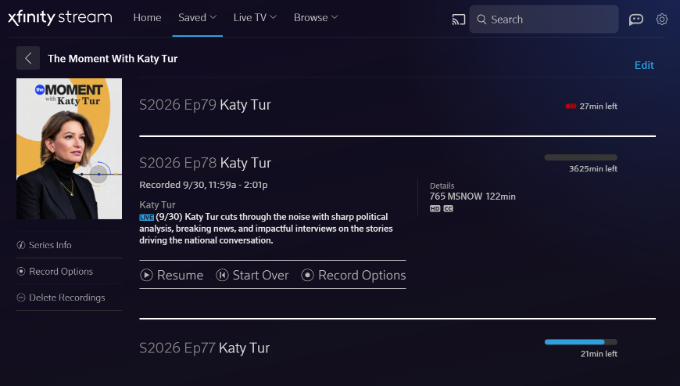
  • Looking at the Saved Recordings list, the metadata calculation is clearly broken—one recording displays an impossible duration of "3625min left" instead of the actual remaining broadcast time.

  • Once a broadcast concludes completely and converts to a static Cloud DVR asset, playback and forward seeking return to normal.

(Attaching screenshots showing the greyed-out fast forward button / pinned playhead, as well as the '3625min left' metadata error).

Troubleshooting Already Completed (Issue Persists):

  • Tested in both Google Chrome and Microsoft Edge on Windows 11 (identical behavior in both).

  • Cleared all site cookies, cache, and local storage data for xfinity.com.

  • Toggled Hardware / Graphics Acceleration off and on.

  • Attempted keyboard navigation shortcuts (Right Arrow, L).

  • Ran a "Sync DVR" command on our physical X1 equipment.

Crucial Detail: This issue is isolated to the web browser player. Playing the exact same in-progress recording on the Xfinity Stream iOS app works perfectly—the live buffer is recognized, scrubbing is fluid, and skip controls function normally.

This points directly to a manifest/metadata parsing bug in the web player rather than a client-side browser cache or network issue. Could an official Comcast/Xfinity representative please escalate this to the web platform engineering team?

Oldest First
Selected Oldest First

Regular Visitor

 • 

4 Messages

1 day ago

I have the exact same issue in my Windows 11 desktop, Samsung smart TV, and Amazon Fire tablet. The timeline shows I've reached the end of my recorded stream with more than 2 hours of unplayed recorded content in place. The fast forward button is grayed out. The fast rewind button is not grayed out but clicking it takes you back to the start of the recorded content rather than back the expected 15 seconds. When the recording is complete, all play controls start to function as expected.

I would very much appreciate an ETA on a fix for this.

Contributor

 • 

127 Messages

@wriley18​ if you get one let us know. After skimming their quarterly reports and some financial articles on various things including a lawsuit they just lost, I'm wondering if there's some intentional slow playing on this issue while they figure out their future and navigate a bunch of changes. 

But I might be wrong.

Regular Visitor

 • 

4 Messages

Will post an update if I get one. Like others, this issue started for me about October 1st. I didn't bother to call in as I assumed this would be quickly fixed. Comcast's responses in this thread have been amusing with multiple Comcast employees asking someone in the thread "if their issue has been resolved" despite Comcast taking no apparent action on their end.

I've asked Claude (Anthropic's AI agent) to examine the problematic player on my windows 11 desktop. The main, and perhaps only issue, is the player's timeline length and also the viewer's current position on the  timeline are set to a distant and unreachable future point. Since these settings make it appear that the user is at the end of the recorded content, the fast forward icon is grayed out. If this timeline issue could be programmatically corrected by Comcast's technical staff, the entire problem might be resolved.

Contributor

 • 

127 Messages

@wriley18​ Yes, it would seem to be simple on the programming side of things (from a couple semesters of CSCI courses a long time ago in college). However, if I ask Xfinity Assistant what Internet plan we have it says 500/100. Our Xfinity Account shows 300/100. And a tech had to come out to get us 100 upload after it worked for months and then went back to like 25. And our TV box throwing errors like APPS-04154 for the c-button sports menu. They blame it on our Xfinity Approved modem/router that we own. They approve it and then it doesn't work LOL. At least now they offer a free modem/router, but this one was hundreds so I don't just want to throw it out LOL. And I swear every week over the last 3 months there is "planned maintenance" that causes some other new glitch in something. Like now sound intermittently pops in and out. Like once an hour but still it's annoying. That just started happening after their last "planned maintenance" a few nights ago. Now it says another is planned early next week. It's kinda comical. Knock on wood, at least the Internet is typically working. Which makes me wonder why they don't just flush away the TV side of things with all the TV box and backend and other issues we've had in the last year (3 tech visits who found nothing wrong with our signals and got us different boxes or had to call in to have full resets on backend stuff that people on here couldn't do or something). It's like they should just wash their hands of cable TV and contract with one of their competitors to supply it. Maybe they are and that's why they aren't wasting time and money fixing it? From what I read, they're going through some pretty major changes and shakeups in terms of Internet vs. content and I'm wondering if the backend teams are a mess and they're waiting on bureaucracy to figure out what's rolling out and what platforms they're using, etc. Which would make sense why something seeming simple for a programmer/engineer is taking like a month+. Cause if they're going to scrap Stream and put everything on Peacock, or vice versa or something like that, it doesn't make sense to fix this if it's happening soon. 

It just feels like, somewhere, they're either not being transparent with what they're doing or they don't know what they're doing.

But who knows.

Visitor

 • 

17 Messages

@jdawg90​ In the meantime, I'll just note that YouTube TV offers a 5-day free trial, and it's been very straightforward to record & watch the World Series games on my PC the way we all used to be able to do with Xfinity. 

Visitor

 • 

17 Messages

@jdawg90​ In the meantime, I'll note that YouTube TV offers a 5-day free trial, and I've easily been able to record and watch the first couple of World Series games on my PC the way we all used to be able to on Xfinity before they broke it.

Visitor

 • 

1 Message

5 hours ago

Count me in as another user with the same problem for a few weeks now. 

forum icon

New to the Community?

Start Here
