



Visitor
•
4 Messages
Web Stream Portal: In-Progress DVR Recordings Disable Fast Forward (Metadata/Duration Bug)
Over the past week, I have been unable to fast-forward in-progress ("in-flight") Cloud DVR recordings when watching via the web portal on Windows 11.
The Symptoms:
The Fast-Forward / Skip Forward button is completely disabled/greyed out in the web player.
The scrub bar registers as filled to the end (
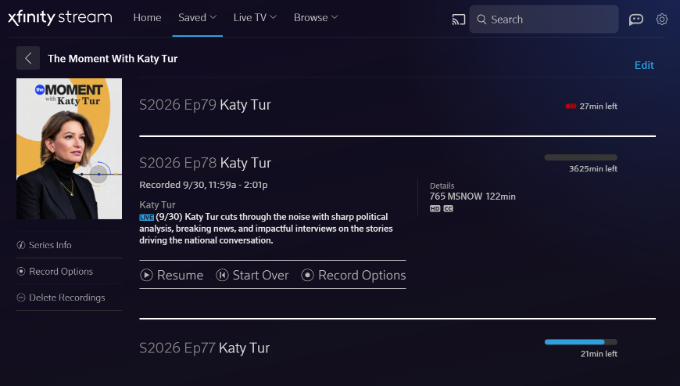
2:01:30), locking the playhead and making it impossible to seek forward through commercial breaks while watching behind real-time.Looking at the Saved Recordings list, the metadata calculation is clearly broken—one recording displays an impossible duration of "3625min left" instead of the actual remaining broadcast time.
Once a broadcast concludes completely and converts to a static Cloud DVR asset, playback and forward seeking return to normal.
(Attaching screenshots showing the greyed-out fast forward button / pinned playhead, as well as the '3625min left' metadata error).
Troubleshooting Already Completed (Issue Persists):
Tested in both Google Chrome and Microsoft Edge on Windows 11 (identical behavior in both).
Cleared all site cookies, cache, and local storage data for
xfinity.com.Toggled Hardware / Graphics Acceleration off and on.
Attempted keyboard navigation shortcuts (Right Arrow, L).
Ran a "Sync DVR" command on our physical X1 equipment.
Crucial Detail: This issue is isolated to the web browser player. Playing the exact same in-progress recording on the Xfinity Stream iOS app works perfectly—the live buffer is recognized, scrubbing is fluid, and skip controls function normally.
This points directly to a manifest/metadata parsing bug in the web player rather than a client-side browser cache or network issue. Could an official Comcast/Xfinity representative please escalate this to the web platform engineering team?


wriley18
Regular Visitor
•
4 Messages
9 hours ago
I have the exact same issue in my Windows 11 desktop, Samsung smart TV, and Amazon Fire tablet. The timeline shows I've reached the end of my recorded stream with more than 2 hours of unplayed recorded content in place. The fast forward button is grayed out. The fast rewind button is not grayed out but clicking it takes you back to the start of the recorded content rather than back the expected 15 seconds. When the recording is complete, all play controls start to function as expected.
I would very much appreciate an ETA on a fix for this.
2
0