



Visitor
•
4 Messages
Web Stream Portal: In-Progress DVR Recordings Disable Fast Forward (Metadata/Duration Bug)
Over the past week, I have been unable to fast-forward in-progress ("in-flight") Cloud DVR recordings when watching via the web portal on Windows 11.
The Symptoms:
The Fast-Forward / Skip Forward button is completely disabled/greyed out in the web player.
The scrub bar registers as filled to the end (
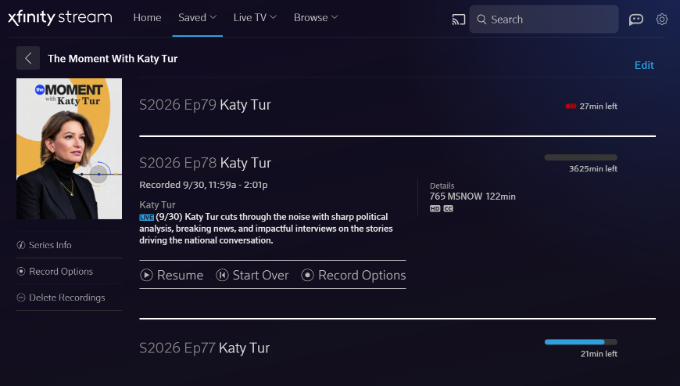
2:01:30), locking the playhead and making it impossible to seek forward through commercial breaks while watching behind real-time.Looking at the Saved Recordings list, the metadata calculation is clearly broken—one recording displays an impossible duration of "3625min left" instead of the actual remaining broadcast time.
Once a broadcast concludes completely and converts to a static Cloud DVR asset, playback and forward seeking return to normal.
(Attaching screenshots showing the greyed-out fast forward button / pinned playhead, as well as the '3625min left' metadata error).
Troubleshooting Already Completed (Issue Persists):
Tested in both Google Chrome and Microsoft Edge on Windows 11 (identical behavior in both).
Cleared all site cookies, cache, and local storage data for
xfinity.com.Toggled Hardware / Graphics Acceleration off and on.
Attempted keyboard navigation shortcuts (Right Arrow, L).
Ran a "Sync DVR" command on our physical X1 equipment.
Crucial Detail: This issue is isolated to the web browser player. Playing the exact same in-progress recording on the Xfinity Stream iOS app works perfectly—the live buffer is recognized, scrubbing is fluid, and skip controls function normally.
This points directly to a manifest/metadata parsing bug in the web player rather than a client-side browser cache or network issue. Could an official Comcast/Xfinity representative please escalate this to the web platform engineering team?


XfinityDemetrise
Official Employee
•
581 Messages
17 days ago
Hi there @user_n1qgg3 Thank you so much for reaching out on our Xfinity Community Forum. I'll be happy to assist. Are you still experiencing this issue?
4
0
sayheykid
Contributor
•
19 Messages
17 days ago
I have the EXACT same problem streaming on my laptop over the last 3 weeks after 31 years with Comcast!!!!!!!!!!!
0
user_74n3yw
Visitor
•
1 Message
17 days ago
I am having the same issue for the first time ever. Last week I was able to fast forward and toggle the slider during a in progress recording while watching on my Chrome browser. This week I am unable to. I have cleared cache, closed the browser, logged out and logged back in. Nothing changes.
1
user_n1qgg3
Visitor
•
4 Messages
16 days ago
I wanted to provide a quick update for anyone tracking this or experiencing the same bug. I followed up via Direct Messaging with Xfinity support to see if this could be escalated, but unfortunately, the front-line workflow is entirely hardwired to physical equipment troubleshooting.
Despite providing a comprehensive technical breakdown upfront—proving via cross-platform testing (working fine on the Xfinity Stream iOS app, broken exclusively on the Windows/Chrome/Edge web portal) and clarifying that no modem or physical X1 DVR box is involved—the support session stalled out in a Tier 1 script loop. I was taken through identity verification, offered irrelevant modem resets/technician truck rolls, and asked redundant click tests.
Because front-line chat support lacks a pathway to escalate software manifest/metadata parsing errors without forcing hardware troubleshooting first, I have closed the chat session. Hopefully, the detailed symptoms captured in the initial post (the '3625min left' duration bug and greyed-out fast-forward on in-flight recordings) make their way to the web engineering team so a proper platform patch can be deployed.
2
sayheykid
Contributor
•
19 Messages
16 days ago
Originally posted by user_1g37kz IT WORKS!!!
1) Delete recording.
2) Go back to Live, select the program and start recording again.
3) Go to Saved/Recordings, at the bottom of the list, you'll find Deleted Recordings the latest of which is the one you just deleted - select Recover.
4) You now have 2 partial recordings of your program (hopefully without much lost in between) - but the first part will now function as a completed program allowing you to RWD/FF as normal.
(edited)
1
StockBoy
Contributor
•
33 Messages
11 days ago
STILL NOT FIXED (for me) - 10/09/2026
18
0
DAN.PET
Visitor
•
12 Messages
10 days ago
Update: This morning the playback appears to be working properly on my Android phone, but still not on my Win11 pc.
0
Btomup
Visitor
•
6 Messages
10 days ago
I have been having the same issue and it has been driving me nuts. I tried chrome and edge, cleared cache/cookies, tried incognito and private mode all with no success.
3
sayheykid
Contributor
•
19 Messages
9 days ago
Comcast simply chooses to ignore us. SHAME. This issue has been posted by myself and others for months.
0
jdawg90
Contributor
•
115 Messages
9 days ago
I just noticed with Green Bay and Chicago recording, when I'm using my laptop, if I select to watch "live TV" it automatically uses the recording and starts from the very beginning of the game. LOL I didn't notice that before. Is that a new broken thing or was that happening to others, too? I had to delete the recording to watch the game live. Maybe this was happening before and I just forgot.
3
user_v8efri
Visitor
•
1 Message
9 days ago
online playback problem fix
1
0
user_335u8p
Visitor
•
1 Message
5 days ago
Same experience here. So frustrating. user_n1qgg3 deserves a Presidential Medal of Freedom for nailing the exact issue so many of us are having.
Where you at, xfinity????
7
DAN.PET
Visitor
•
12 Messages
1 day ago
This morning I received a promising Voicemail from Xfinity, saying that "We're calling to let you know the Xfinity TV issue you reported recently should be resolved. If you're still experiencing this issue, please call us at 1-800-266-2278 and a care agent will assist you. We appreciate your patience and thank you for being an Xfinity customer."
I just checked, and the problem has NOT been resolved - it's the same as when I first reported it nearly 3 weeks ago and others have reported. Anyone else seeing any progress?
2
JonnyIndica
New Poster
•
2 Messages
17 hours ago
I have same problem, very frustrating
2
StockBoy
Contributor
•
33 Messages
2 hours ago
same issue for at least 3 weeks now. still NOT fixed... and 3 sequential season-opening NBA games start today in about 90-MINUTES on NBC (owned by comcast)!!!! [recording/watching Football games (NFL and college) have been Madden-ing enough already!]
"someone" at Xfinity Stream is going to lose their job(s) if these 3 NBA season opening games (that comcast paid a TON of money to broadcast) aren't able to be watched like WE PAY to be able to watch our live recordings and control them. IMO this is going to cost comcast $-MILLIONS-$ if not fixed right now.
everyone using any windows pc, any browser, any browser mode (incognito/private/regular/whatever), on the xfinity.com/stream website... live-in-progress-recordings are NOT able to be controlled. if we use any control function other than pause while viewing a live recording (on-screen button or keyboard button or trying to drag/move the recording progress bar) the playback jumps back to the very beginning of the recording and starts over. there is no controlling the viewing until the live recording is finished and we go back to the main Recordings list and start viewing from the beginning as a now-finished recording.
this problem has been explained ad-nauseam in many different forum topics here and via many different users/threads/posts/replies. this is not an issue of US USERS not doing or having tried something. WE have tried EVERYTHING. rebooting. clearing out browser cache. signing out. using diff browsers, diff modes. restarting routers. disconnecting and powering everything down simultaneously overnight. nothing works!!!!!
this is an xfinity created problem somehow, for all windows pc and browser users at least since the beginning of October. All other devices (tv, phone, tablet, apps) seem to have been fixed from what i've read (which also had this issue since at least August 26th, by one post).
Windows users on xfinity.com/stream are STILL frustratingly waiting for a fix since at least October 1st (3 weeks now).
XFINITY REPS - I know you didn't create this problem... Please do whatever YOU can to escalate this RIGHT NOW and get this problem fixed ASAP. and please post back here with any UPDATE for us paying customers. Thank you!
0