



Visitor
•
4 Messages
Web Stream Portal: In-Progress DVR Recordings Disable Fast Forward (Metadata/Duration Bug)
Over the past week, I have been unable to fast-forward in-progress ("in-flight") Cloud DVR recordings when watching via the web portal on Windows 11.
The Symptoms:
The Fast-Forward / Skip Forward button is completely disabled/greyed out in the web player.
The scrub bar registers as filled to the end (
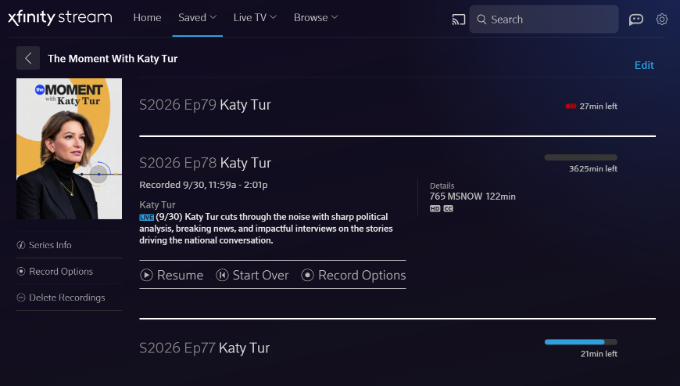
2:01:30), locking the playhead and making it impossible to seek forward through commercial breaks while watching behind real-time.Looking at the Saved Recordings list, the metadata calculation is clearly broken—one recording displays an impossible duration of "3625min left" instead of the actual remaining broadcast time.
Once a broadcast concludes completely and converts to a static Cloud DVR asset, playback and forward seeking return to normal.
(Attaching screenshots showing the greyed-out fast forward button / pinned playhead, as well as the '3625min left' metadata error).
Troubleshooting Already Completed (Issue Persists):
Tested in both Google Chrome and Microsoft Edge on Windows 11 (identical behavior in both).
Cleared all site cookies, cache, and local storage data for
xfinity.com.Toggled Hardware / Graphics Acceleration off and on.
Attempted keyboard navigation shortcuts (Right Arrow, L).
Ran a "Sync DVR" command on our physical X1 equipment.
Crucial Detail: This issue is isolated to the web browser player. Playing the exact same in-progress recording on the Xfinity Stream iOS app works perfectly—the live buffer is recognized, scrubbing is fluid, and skip controls function normally.
This points directly to a manifest/metadata parsing bug in the web player rather than a client-side browser cache or network issue. Could an official Comcast/Xfinity representative please escalate this to the web platform engineering team?


XfinityDemetrise
Official Employee
•
556 Messages
6 days ago
Hi there @user_n1qgg3 Thank you so much for reaching out on our Xfinity Community Forum. I'll be happy to assist. Are you still experiencing this issue?
4
0
sayheykid
New Poster
•
12 Messages
6 days ago
I have the EXACT same problem streaming on my laptop over the last 3 weeks after 31 years with Comcast!!!!!!!!!!!
0
user_74n3yw
Visitor
•
1 Message
6 days ago
I am having the same issue for the first time ever. Last week I was able to fast forward and toggle the slider during a in progress recording while watching on my Chrome browser. This week I am unable to. I have cleared cache, closed the browser, logged out and logged back in. Nothing changes.
1
user_n1qgg3
Visitor
•
4 Messages
5 days ago
I wanted to provide a quick update for anyone tracking this or experiencing the same bug. I followed up via Direct Messaging with Xfinity support to see if this could be escalated, but unfortunately, the front-line workflow is entirely hardwired to physical equipment troubleshooting.
Despite providing a comprehensive technical breakdown upfront—proving via cross-platform testing (working fine on the Xfinity Stream iOS app, broken exclusively on the Windows/Chrome/Edge web portal) and clarifying that no modem or physical X1 DVR box is involved—the support session stalled out in a Tier 1 script loop. I was taken through identity verification, offered irrelevant modem resets/technician truck rolls, and asked redundant click tests.
Because front-line chat support lacks a pathway to escalate software manifest/metadata parsing errors without forcing hardware troubleshooting first, I have closed the chat session. Hopefully, the detailed symptoms captured in the initial post (the '3625min left' duration bug and greyed-out fast-forward on in-flight recordings) make their way to the web engineering team so a proper platform patch can be deployed.
2
sayheykid
New Poster
•
12 Messages
5 days ago
Originally posted by user_1g37kz IT WORKS!!!
1) Delete recording.
2) Go back to Live, select the program and start recording again.
3) Go to Saved/Recordings, at the bottom of the list, you'll find Deleted Recordings the latest of which is the one you just deleted - select Recover.
4) You now have 2 partial recordings of your program (hopefully without much lost in between) - but the first part will now function as a completed program allowing you to RWD/FF as normal.
(edited)
0
0
StockBoy
New Poster
•
18 Messages
5 hours ago
STILL NOT FIXED (for me) - 10/09/2026
1
0