
jdawg90's profile

Contributor

 • 

119 Messages

10/06/2026 1:24 AM

DVR Doesn't Allow Rewind or Fast Forward

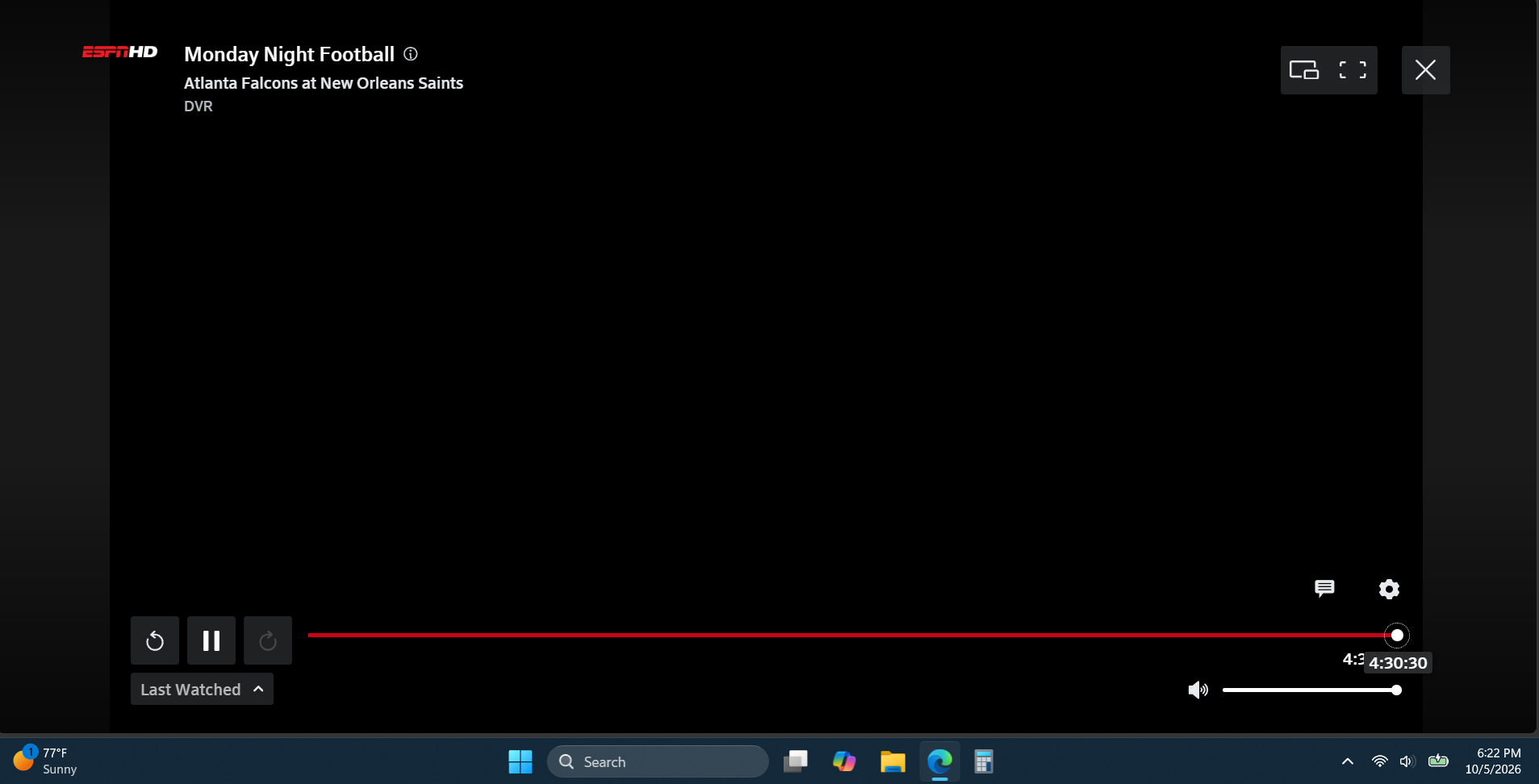
I DVR'd Monday Night Football and the meter that shows how far into the game we are is all the way to the right with no option to rewind or fast forward. It was doing this last week, too, and I assumed ya'll might notice and fix it. I'm on a Windows 11 laptop fully updated with the Windows updates. It also does it on my Android phone with the Stream App for Android.

So it shows I've been watching 4 hours and 30 minutes on the meter but it's basically the end of the 1st quarter right now. And it starts at the beginning of the football game when I started recording near the end of the 1st quarter. And I can't fast forward or click "live" to get to where it's live. 

Ya'll need to stop breaking things at Xfinity. See my picture below. The game started at a little over an hour ago Pacific time, and it shows I'm at the 4 hour 30 minute mark. LOL

Oldest First
Selected Oldest First

Community Best Answer

Official Employee

 • 

3.9K Messages

15 days ago


jdawg90. I can certainly understand your frustration, especially when you're trying to watch a live sporting event, and the DVR controls aren't functioning as expected. Based on the behavior you're describing, where the progress bar is showing an incorrect playback position and rewind, fast-forward, and "Live" functions are unavailable, this does sound like a known issue we've seen affect some Xfinity Stream users across multiple devices. Since you're experiencing the same behavior on both your Windows 11 laptop and the Xfinity Stream app on Android, it does not appear to be isolated to a specific device. We appreciate you sharing the screenshot and detailed description, as that helps confirm what you're seeing. Our engineering teams are aware of the issue and are actively working toward a resolution. While I don't have a specific timeline to provide, I can assure you the reports are being investigated. We apologize for the inconvenience, especially during live events like Monday Night Football, and appreciate your patience while our teams work to correct the problem. 


New Poster

 • 

3 Messages

This has been a known issue for WEEKS and the Xfinity engineers apparently have no solution. It only occurs when you're trying to watch a program that is being actively recorded. Once the whole program is recorded, navigation controls function properly. However, if you try to navigate through a program that is being live-recorded, the navigation controls are disabled and the progress bar circle is shifted all the way to the right. It's a problem for video clippers who record live programming and need to toggle back and forth to review clips or for routine watching when you want to fast forward through segments or commercials. Unacceptable for this to remain unfixed for so long. 

Visitor

 • 

1 Message

I’m with you!!! So ridiculous… the reason I record is so I don’t have to listen to the stupid commercials and half time!!!

Contributor

 • 

119 Messages

17 days ago

At least the error is honest LOL. Now I deleted that recording and started a new recording. And it starts from the same soup commercial but the meter works. But I had to fast forward to the point in the game I'd left off. Normally, when I hit "record" at 6:25pm, it starts the recording at 6:25pm. I guess now it loads the entire football game from the beginning? That's fine, maybe has something to do with the ESPN app we get "for free" through Xfinity, but it's got issues figuring itself out.


Contributor

 • 

119 Messages

Now I closed my browser to do some tasks and cook dinner, went to watch again, and I'm getting this error. It was being unwatchable again so I thought "I'll just delete it and fast forward to the 2nd quarter if that works" and it won't even let me delete it saying it's in use in another app! But it's not...that's the interesting thing. 


Contributor

 • 

119 Messages

16 days ago

It seems, given reading through the threads on this forum, this *should* be a known issue to Xfinity? That your web-based Xfinity Stream is fully dysfunctional and not working? 

Contributor

 • 

33 Messages

8 days ago

this issue remains unfixed since August 26th (or earlier for some users who posted prior).  and now it looks like posts "here" were deleted by comcast.  only jdawg90's posts remain under this topic.  one post that i was notified about by "following" this thread, suggested hiring a lawyer to get someone at comcast to care about this enough.  that post has been deleted.  hmmmm...

Visitor

 • 

1 Message

7 days ago

It's been two weeks and dvr on computer browsers still won't fast forward or rewind. Are y'all going to do something or do I have to switch cable companies?

Official Employee

 • 

3K Messages

Is this still happening to you, @user_02159d? If so, may we ask what troubleshooting you've tried so far?

I am an Official Xfinity Employee.
Official Employees are from multiple teams within Xfinity: CARE, Product, Leadership.
We ask that you post publicly so people with similar questions may benefit from the conversation.
Was your question answered? Please mark as Best Answer.tick

Frequent Visitor

 • 

15 Messages

Not only is my DVR still not working after almost two months, but you’ve repeatedly closed out my tickets and have apparently closed out my last chat with you as I can no longer find it.  

Contributor

 • 

119 Messages

@XfinitySara​ I'm the OP and it's still messed up. Only seems to be on Windows using a browser. TV box and phone app seem to work for me?!? (hopefully continues). Multiple Xfinity employees on here have said it's a known issue and engineers are working on it but there's no known ETA for a fix. 

Are you asking because it's supposed to be fixed? Or are you asking if it's still happening because you aren't aware it's a known issue your engineers are working on with no known ETA for a fix?

Official Employee

 • 

2.5K Messages

Thank you for using the Xfinity Community Forums page to reach out.


You're absolutely right to be upset about this. Nearly two months is already far too long to be dealing with the same DVR problem, and seeing tickets closed without the issue actually being resolved only makes the experience more frustrating. Losing access to the previous conversation on top of that can understandably make it feel like all the progress you've made has been lost.

Rather than asking you to retell the entire story, let's pick this up from the current issue. Please let me know exactly what happens when you try to use the DVR now, including any error message or whether the problem involves recording, playback, accessing saved recordings, or something else. From there, we can concentrate on the next appropriate step instead of repeating troubleshooting you've already gone through.

I am an Official Xfinity Employee.
Official Employees are from multiple teams within Xfinity: CARE, Product, Leadership.
We ask that you post publicly so people with similar questions may benefit from the conversation.
Was your question answered? Please mark as Best Answer.tick

Frequent Visitor

 • 

15 Messages

Rather than get more aggravated explaining the same thing for the 5th time, here’s a cut and paste from another paying customer of yours experiencing the same problem        This has been a known issue for WEEKS and the Xfinity engineers apparently have no solution. It only occurs when you're trying to watch a program that is being actively recorded. Once the whole program is recorded, navigation controls function properly. However, if you try to navigate through a program that is being live-recorded, the navigation controls are disabled and the progress bar circle is shifted all the way to the right. It's a problem for video clippers who record live programming and need to toggle back and forth to review clips or for routine watching when you want to fast forward through segments or commercials. Unacceptable for this to remain unfixed for so long. 

Frequent Visitor

 • 

15 Messages

3 days ago

Please issue a credit for one month of service to my account.  

Official Employee

 • 

2.5K Messages

Once the issue is resolved, we would be happy to look into a potential adjustment for the cost of the DVR service on your account during the length of time the issue has been prevalent for you.

I am an Official Xfinity Employee.
Official Employees are from multiple teams within Xfinity: CARE, Product, Leadership.
We ask that you post publicly so people with similar questions may benefit from the conversation.
Was your question answered? Please mark as Best Answer.tick

Contributor

 • 

33 Messages

2 days ago

this post has been marked with "Community Best Answer" BUT it is still unresolved.  whomever marked it this way, please undo that if possible because it "appears" to newcomers that this issue/problem has been resolved, when it definitely has not been resolved, or even described in technical detail to us unhappy users as to what caused the problem and why it is NOT being fixed at all for WEEKS, for windows users on a browser in the xfinity.com/stream website.  thank you to all who keep posting about this live-recording playback control problem on windows/browsers.

New Poster

 • 

17 Messages

2 days ago

For what it's worth, I've been having the same issue with the streaming app since August too.  I suspect everyone has this issue!

-MikeCR

Contributor

 • 

26 Messages

2 days ago

Xfinity's handling of this known issue can only be labeled as DISGRACEFUL. I have been a Comcast subscriber for over 30 years. 

Frequent Visitor

 • 

15 Messages

2 days ago

Pathetic, incompetent, dishonest, disgraceful and uncaring.  I’ve been promised calls from Support that were never made.  I’ve been told repeatedly that my issue has been resolved when it hasn’t.  I’ve had my support tickets closed out multiple times when absolutely nothing was fixed.  And then someone BOT there has the gall to ask me again what isn’t working.  

New Poster

 • 

17 Messages

1 day ago

Yesterday I was told this issue was resolved, but I'm on with support today and am being told that their engineers are aware of the problem and are trying to fix it.   For what it's worth.

New Poster

 • 

17 Messages

4 hours ago

And as an additional update, I added the Xfinity streaming app to my Amazon Firestick, and I can confirm that everything works fine on it, including fast forwarding during recording.   It's only on a computer that continues to be broken, which I find very inconvenient since I've watched it on computers for years now.  

Frequent Visitor

 • 

15 Messages

12 minutes ago

Needless to say my DVR after two months is still not working on my Samsung TV or computer.  

Contributor

 • 

119 Messages

5 minutes ago

Comcast released their quarterly earnings/market report today. Things like this don't help keep subscribers. I laugh when I read the market reports because it's like, "CEO person, you could literally call anyone on this thread and we'd have better ideas to keep customers than what you're obviously trying."

forum icon

New to the Community?

Start Here