


Visitor
•
5 Messages
xfinitywifi sign-in error: "not available with your tier of service" after account switched to customer-owned equipment
Hi everyone, hoping an Xfinity employee can pick this up. Store, chat, and phone support have not been able to resolve it.
My setup: Xfinity Internet 2 Gbps over EPON fiber with my own gateway, no leased equipment. The forum team here previously helped me get the ONT provisioned for my own router, and the home connection works great.
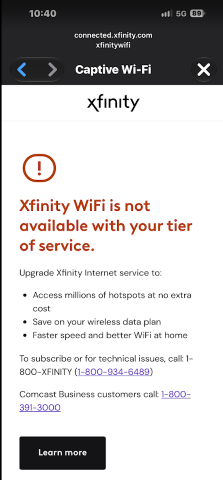
The problem: since the account was updated to reflect customer-owned equipment, nobody in my household can sign into the public xfinitywifi hotspots. At connected.xfinity.com we get: "Xfinity WiFi is not available with your tier of service." Screenshot attached below.
What I have ruled out:
- Not the hotspot or the device. The error follows my Xfinity ID as well as family member's ID's across devices and locations.
- Shouldn't be a plan issue. I am on 2 Gbps, and Xfinity's hotspot policy page says access is included with Xfinity Internet with no equipment requirement.
- I don't know that this is relevant but a person in a store had me connect to some secret squirrel SSID in the store and that worked fine.
My best guess at this point based on my research is that the account recode dropped or miscoded the hotspot entitlement, or my Xfinity ID got orphaned from the active account during the rebuild but I can still sign in so maybe that second thing isn't it. Could someone check if there's an entitlement missing, maybe things need reprovisioned, or something else.
Happy to share account details in a DM. Thanks.

XfinityKei
Official Employee
•
2.8K Messages
1 day ago
@user_nekh66 Our team can help. Is your connection overall working ok?
Can you please direct message me your first and last name along with your full service address, so we can check over everything.
To do so, click on the chat icon located at the top right of this forum's page.
Here are the detailed steps to direct message us:
• Click "Sign In" if necessary
• Click the "Direct Message” icon (upper right corner of this page)
• Click the "New message" (pencil and paper) icon
• Type "Xfinity Support" in the "to" line and select "Xfinity Support" from the drop-down list
• Type your message in the text area near the bottom of the window
• Press Enter to send your message
0
0