

Visitor
•
1 Message
Missing Equipment Shipment - Two Service Addresses - October 3
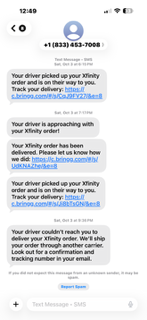
I have reviewed both Bringg tracking links associated with the October 3 delivery notifications. One shows completed, and the second shows cancelled.
The 9:36 PM notification specifically stated that the order would be shipped through another carrier and that I would receive an email with confirmation and tracking information.
I never received that confirmation.
I also have two separate Xfinity service addresses, and none of the notifications identified which address either delivery was associated with.
I need Xfinity to establish:
- Which service address was associated with the completed delivery.
- Which service address was associated with the cancelled delivery.
- What equipment was included in each delivery.
- Whether the cancelled order was ever reshipped.
- If reshipped, the carrier, tracking number, and proof of delivery.
I am also requesting that equipment-return deadlines and any unreturned-equipment charges be suspended until this investigation is complete.
I should not be responsible for equipment that Xfinity cannot establish was delivered.
I also need to know what the original wifi extender looks like at the 309 service address so that I can replace it with new one sent. I received a shipment at the 309 address with new router/wifi extender. I am not at the address currenlty and could not install the extender as I don't know what the original looks like compared to the new one. I only show a metal small box connected with approximately 3 cables connected.
Thanks,
Summer [Edited: "Personal Information"]

XfinityJon
Official Employee
•
2K Messages
11 minutes ago
Good afternoon user_dh1p2w I would be more than happy to look into this further for you. Since I will need account specific information, I will need you to send us a direct message.
Please send us a direct chat message with your full name and complete service address to “Xfinity Support”. To do so, click on the chat icon located at the top right of this forums page.
To send a "Direct Message" to Xfinity Support:
Click "Sign In" if necessary
Click the "Direct Messaging" icon
Click the "New message" (pencil and paper) icon
The "To:" line prompts you to "Type the name of a person". Instead, type "Xfinity Support" there
As you are typing a drop-down list appears. Select "Xfinity Support" from that list
An "Xfinity Support" graphic replaces the "To:" line
Type your message in the text area near the bottom of the window and press Enter to send it.
0
0