



Regular Visitor
•
16 Messages
Is this the new Quality Customer Service? - Comcast Tech installed a 2-Way splitter on my service drop to provide service for my neighbor.
For a week, I've been without DVR and the TV image keeps pixelating.
This problem was resolved with a service call on Feb 3, 2026.
Turns out - a splitter had been installed after the main trunk cable 4-Way drop, in-ground service box.
My cable up/downstream signal strength improved by 3dbmV after the 2-Way splitter was removed.
So Today Oct 15, my neighbor tells me couple days ago, the Comcast Tech tapped my cable service drop (another splitter re-installed) to provide service for their house.
Apparently, the Trunk Cable 4-Way drop has a bad output so the tech decided to downgrade my signal strength and never notified me of the modification.
Yep, my Cable Modem ports signal strength is down -3dbmV again.
[Edit: Inflammatory remark]
Internet Speed is now below the service I'm paying for and I'm without DVR and the TV image keeps pixelating.
So how can the customer get quality cable service when the first option is to downgrade the signal strength
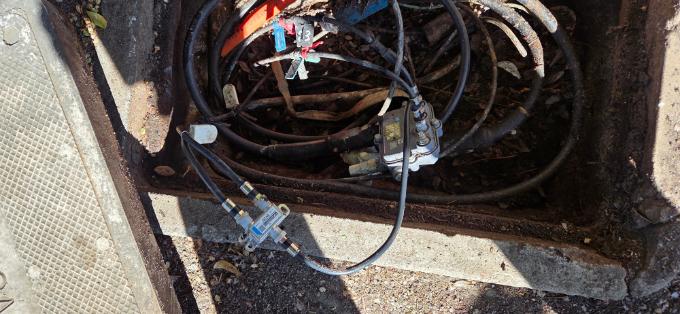
.

XfinityEva
Official Employee
•
2.8K Messages
5 hours ago
How to Send Us a Direct Message:
1. Click "Sign In" if necessary.
2. Click the "Direct Messaging" icon.
3. Click the "Start new conversation" (pencil and paper) icon.
4. In the "To:" line, type "Xfinity Support".
5. As you type, a drop-down list will appear. Select "Xfinity Support" from that list.
6. An "Xfinity Support" graphic will replace the "To:" line.
7. Type your message in the text area near the bottom of the window.
8. Press Enter to send it.
For an example of how to send us a Direct Message, check out this link
How to direct message within the forum
0
0