


Visitor
•
2 Messages
Incomplete installation after recent neighborhood cable upgrade
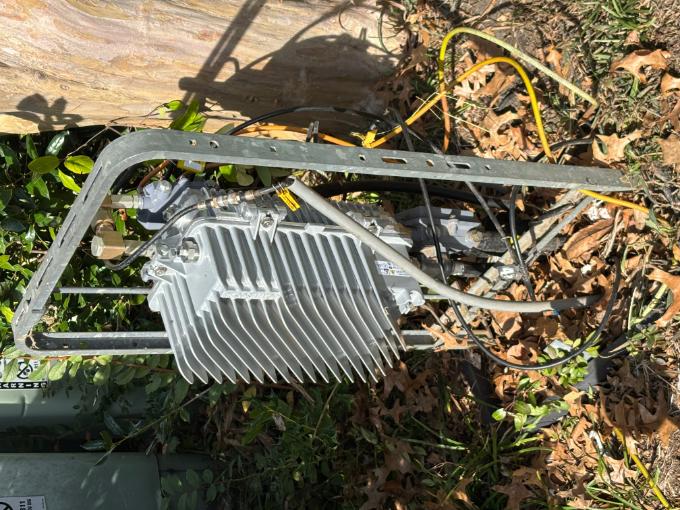
I am attaching a photograph of the Comcast neighborhood cable distribution equipment following your recent upgrade. As you can see, the equipment is completely exposed, and the large green protective enclosure has been left sitting beside it. The previous enclosure apparently no longer accommodates the upgraded equipment. However, leaving the distribution equipment and its connections exposed without an appropriate protective housing raises concerns about weather exposure, moisture intrusion, corrosion, and potential equipment damage. This equipment is located on private residential property and serves the surrounding neighborhood.
I have contacted Xfinity previously, but the issue remains unresolved. I am requesting that this be referred to your outside plant maintenance department for an inspection and correction. Please determine what protective enclosure is required for this upgraded equipment and arrange for its proper installation.
I would appreciate a reference number and confirmation of when this will be addressed.

user_bep4pv
Visitor
•
2 Messages
1 day ago
I had to resize this photo to upload it. This is the cable etc and the box sitting next to it. The technicians left it uncovered.
0
0
XfinityMarshante
Official Employee
•
1.6K Messages
5 hours ago
Hello @user_bep4pv, thank you for taking the time to leave a post. Thank you for bringing this to our attention and for providing a photo and detailed explanation of the issue. I can understand why seeing the upgraded equipment and connections left exposed on your property would be concerning, especially after you’ve already contacted us and are still waiting for a resolution. We’d like to take a closer look and help get this in front of the appropriate team for inspection. If you could send our team a direct message with your full name, the name listed on the account (if different), and the service address associated with your account, we'd be more than happy to look into this for you.
How to send us a direct message:
0
0