


Contributor
•
76 Messages
Multi-Month Peacock Double Billing & Pending Order Lockout + Rep Hung Up Chat
Hello Xfinity Support,
I have been a Comcast/Xfinity customer since 2005 and need help resolving three billing and account issues that a recent chat rep mishandled (and abruptly disconnected the chat on when I declined an upsell):
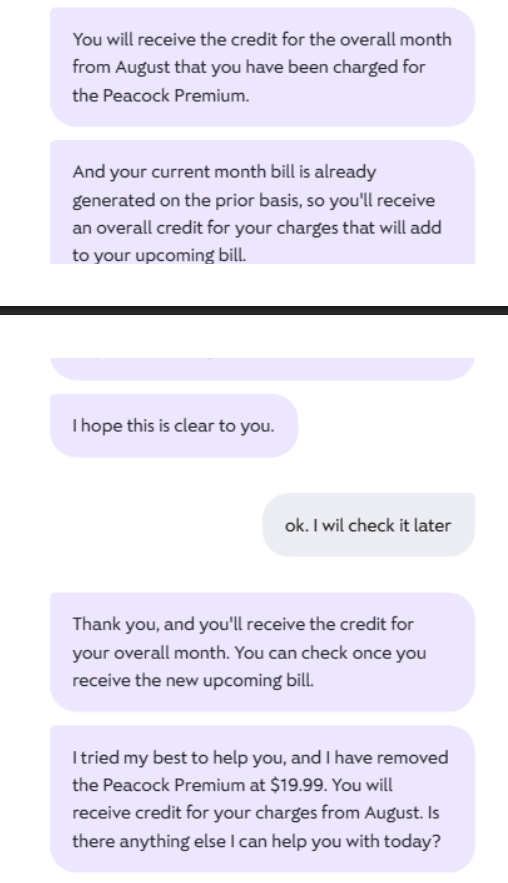
- Duplicate Peacock Billing Credit: I have been double-billed for a standalone Peacock subscription while already paying for StreamSaver (which includes Peacock for $12.99 with the & upgrade). A rep set the standalone Peacock to cancel on December 4, but did not submit a ticket for the past 4 months of duplicate charges ($79.96 total). Please confirm the standalone Peacock removal will not affect my StreamSaver Peacock access, and apply a full multi-month billing credit for the duplicate charges.
- Remove ALLBLK ($6.99/mo): Because of the pending December 4 order on my account, the Xfinity app and my X1 box are blocking me from removing my self-added ALLBLK subscription. Please remove ALLBLK immediately without altering my underlying 300 Mbps + TV Core bundle.
- Chat Transcript Review: Please review my recent chat transcript where the agent falsely claimed ALLBLK couldn't be removed without changing my TV/internet plan and ended the chat when I refused to repackage my services.
Thank you for getting this sorted out properly.

XfinityJamesC
Official Employee
•
3.4K Messages
7 hours ago
Greetings, @rhondasag! I hope your week has been treating you well. Thanks so much for taking a moment out of your busy day to leave a post on our community forum about these billing issues. You have definitely come to the right place for assistance.
You should be able to cancel a standalone Peacock Premium subscription without impacting your StreamSaver bundle, as long as the StreamSaver bundle remains intact. We should also be able to remove your ALLBLK channel package without having to repackage your other services, but we can still review the chat transcript to see if there were any outlying factors preventing this simple removal when you reached out.
If you could send our team a direct message with your full name, the name listed on the account (if different), and the service address associated with your account, I'd be more than happy to look into this for you.
To send a Direct Message, please click on the “Direct Message” (speech bubble) icon in the top-right corner of the screen, then the "Start new conversation" (pencil and paper) icon. In the section, type or select "Xfinity Support" and type your message in the text area near the bottom of the window and press Enter to send your message and initiate a live session. You can see how to send us a direct message here, https://forums.xfinity.com/conversations/guidelines/how-to-direct-messaging-within-the-forum/697ba1e570934d009185c514.
1
0